
Is Your Website Ready for AI Crawlers? A 10-Point Technical Checklist

The short answer
An Allow directive in robots.txt only sets a rule. It does not prove that AI engines have crawled, indexed, or cited your website.
Writing Allow in your robots.txt file simply states that an automated agent has permission to request a URL. It does not prove that an AI engine has crawled, parsed, indexed, or cited your content.
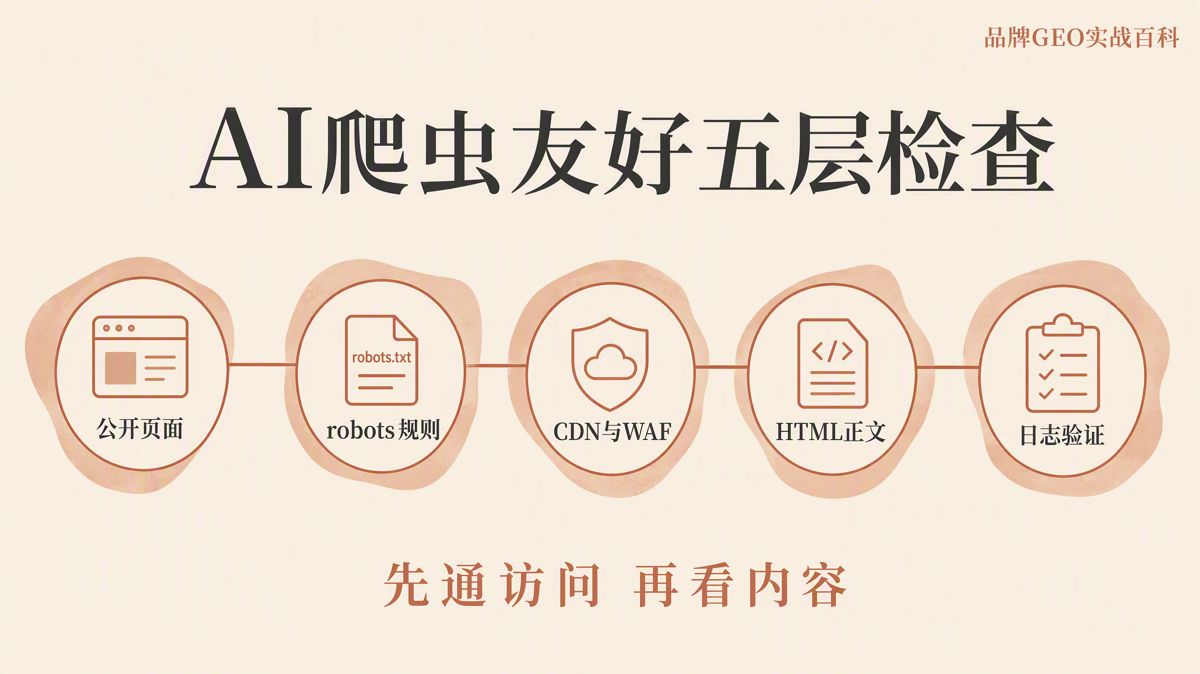
AI crawlers are automated programs run by search and foundation-model platforms to fetch web pages. The robots.txt file sits in your root directory to declare crawl permissions. To verify whether your site is genuinely accessible to these agents, you need to answer five core questions:
- Can target URLs be accessed publicly without authentication?
- Have you configured separate rules for search indexing, model training, and user-initiated browsing?
- Are your CDN (Content Delivery Network) and WAF (Web Application Firewall) blocking legitimate crawler requests?
- Does the raw HTML response from your server contain the actual body text?
- Do your server and edge logs confirm that verified crawler requests succeeded?
Passing these checks confirms only that your site is technically readable. It does not guarantee that any platform will index, reference, or recommend your pages.
Understand the Four Levels of Technical Verification
Before auditing your setup, distinguish between these four stages:
- Access permitted by rule: Your
robots.txtdoes not disallow the specific user agent on that path. - Simulated fetch succeeded: A command-line request or inspection tool retrieved the page successfully.
- Real request succeeded: Verified platform crawlers appear in your CDN or server access logs with 200-series status codes and complete response payloads.
- Content cited by the engine: The platform uses your page directly within AI answers or organic search citations.
Each stage builds on the previous one. A rule allowing access does not mean a fetch occurred, and a successful fetch does not mean your page has been indexed.
Remember that robots.txt is not an access-control mechanism. Confidential content must sit behind authentication, access tokens, or firewall restrictions.
The 10-Point Audit Checklist
| Item | Focus Area | Passing Standard | Common Failure Points |
|---|---|---|---|
| 1 | Public Access | Public URLs return HTTP 200 without login prompts | Auth walls, geo-blocks, forced CAPTCHAs |
| 2 | robots.txt | Accessible at root, clear rules, no syntax conflicts | 404 on robots.txt, accidental Disallow: / |
| 3 | User Agents | Split by search, model training, and user actions | Treating all bots from one vendor identically |
| 4 | CDN & WAF | Legitimate crawler IPs pass without challenges | WAF blocking bots despite robots.txt allow rules |
| 5 | Raw HTML | Core text and key links present in raw server response | Blank shells dependent entirely on JavaScript |
| 6 | Indexing Directives | noindex and canonical tags align with crawl rules |
Blocking crawl while expecting noindex to work |
| 7 | Internal Discovery | Pages linked through site architecture and XML sitemaps | Orphan URLs reachable only via direct links |
| 8 | Dependent Assets | APIs, critical images, and stylesheets return HTTP 200 | Content APIs returning 403 to automated clients |
| 9 | Log Verification | Confirmed bot IPs, matching user agents, full payload | Relying solely on synthetic browser tests |
| 10 | Request Stability | Low error rates and balanced rate limits | Frequent 429 Too Many Requests or 5xx crashes |
1. Verify Unauthenticated Public Access
Open your target URLs in a clean environment without cookies, active sessions, or local storage.
Your baseline requirements:
- Valid HTTPS connection with no certificate errors.
- Clean redirect chains that resolve to HTTP 200 (the standard HTTP success status).
- Full body text visible without requiring a user login.
- No forced redirects to CAPTCHAs, regional landing pages, age gates, or app install prompts.
Do not audit only your homepage. Sample individual product pages, blog posts, and technical documentation. A functioning homepage does not mean deep pages are accessible.
Avoid redirect loops. Moving from HTTP to HTTPS or mapping old paths to new URLs is normal, but every redirect must resolve cleanly to a page containing the intended content.
If an intended public page returns any of these status codes, fix the underlying infrastructure before assessing crawler readiness:
401 Unauthorized: Authentication required.403 Forbidden: Server or WAF refused access.404 Not Found: Page does not exist.410 Gone: Page intentionally removed.429 Too Many Requests: Rate limit triggered.5xx: Server-side application errors.
2. Inspect robots.txt Accessibility and Syntax
Your robots.txt file must live at the exact root of your domain:
https://example.com/robots.txt
Verify three structural requirements:
- The file returns HTTP 200 directly, without login barriers or firewall challenges.
- The global
User-agent: *block does not contain an unintendedDisallow: /. - Specific user-agent directives do not conflict with fallback rules.
The User-Agent field identifies the automated client making the request. While an Allow directive states your preference, it does not enforce security.
Google's documentation makes clear that robots.txt manages crawling volume, not indexing. If an external site links to a disallowed URL, search engines can still index that URL and display it without a snippet. If a page contains private data, secure it behind authentication rather than relying on Disallow.
3. Configure Rules by Crawler Purpose
"AI bot" is not a single category. Platforms operate separate user agents for general search crawling, model training data collection, and direct user-initiated browsing. You can set different policies for each.
You can allow search crawlers to access your public documentation while blocking offline training scrapers. Base your configurations on current official documentation rather than static, outdated scraper lists.
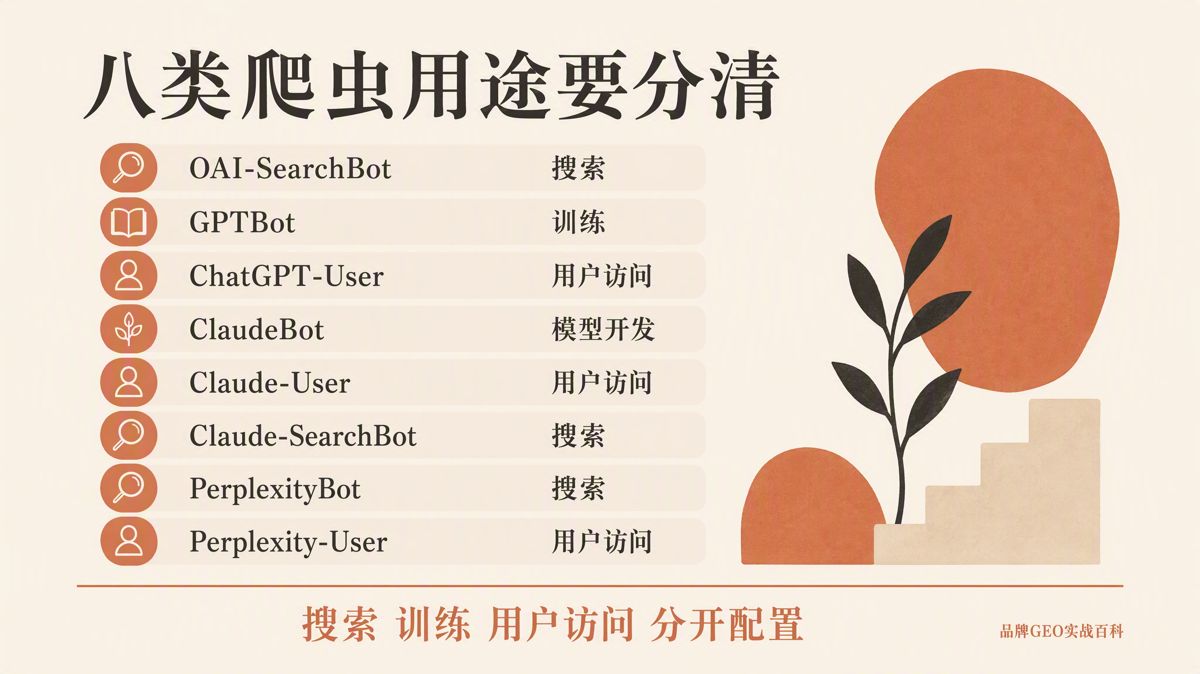
| Platform & User Agent | Stated Purpose | Audit Priority |
|---|---|---|
OpenAI OAI-SearchBot |
ChatGPT search indexing | Allow search paths; whitelist official IP ranges in WAF |
OpenAI GPTBot |
Foundation model training data | Align with your intellectual property and training policies |
OpenAI ChatGPT-User |
Real-time user browsing | Treat as an on-demand fetch, not a background indexer |
Anthropic ClaudeBot |
Model training and data collection | Manage separately from real-time search indexing |
Anthropic Claude-User |
Live user-prompted fetching | Ensure target URLs respond cleanly to live requests |
Anthropic Claude-SearchBot |
Search indexing and retrieval quality | Verify search landing pages are not blocked |
Perplexity PerplexityBot |
Indexing for Perplexity search | Check access rules in both robots.txt and your WAF |
Perplexity Perplexity-User |
Live user browsing actions | Perplexity states this bypasses robots.txt; manage via WAF and auth |
OpenAI separates OAI-SearchBot, GPTBot, and ChatGPT-User. Anthropic documents ClaudeBot, Claude-User, and Claude-SearchBot. Perplexity maintains separate profiles for PerplexityBot and Perplexity-User.
Maintain a dated internal record documenting:
- Which agents are permitted or restricted.
- Which URL directories are open or protected.
- The official platform documentation URL backing each decision.
Keep version-controlled snapshots of your robots.txt so your engineering and marketing teams can track changes over time.
4. Audit CDN, WAF, and Edge Security Layers
A permissive robots.txt file means nothing if your infrastructure blocks incoming connections upstream. CDNs, WAFs, server firewalls, and application gateways often intercept requests before they reach your web server.
Common failure points include:
- Treating all non-browser requests as malicious scraping.
- Enforcing mandatory JavaScript challenges (such as Cloudflare Turnstile or similar browser checks).
- Blocking requests based on broad geographic IP ranges.
- Blacklisting commercial data center IP blocks.
- Triggering HTTP 429 rate limits under light sequential scraping.
These configurations explain why an open robots.txt can still result in HTTP 403 errors in crawler logs.
Do not rely solely on the User-Agent header for allowlisting, as it can be spoofed. Perplexity recommends that WAFs validate both the User-Agent string and official IP ranges. OpenAI also publishes IP address blocks for its search and training bots. Pull these ranges directly from official vendor endpoints and update them regularly.
5. Ensure Raw HTML Contains Primary Content
Seeing text in your desktop browser does not prove that an AI scraper can extract it.
Fetch your pages using curl, raw HTTP inspection tools, or browser source inspection (View Source, not Inspect Element). The primary headline, main text, technical specifications, author information, publication dates, and key internal links must appear directly within the server-returned HTML markup.
If the initial payload returns an empty div wrapper alongside large JavaScript bundles that assemble the page client-side, many bots will fail to parse the content.
You do not need to abandon JavaScript frameworks. Instead, adopt an architecture that delivers readable text on the initial round trip:
- Server-Side Rendering (SSR): The origin server compiles the HTML before sending it.
- Static Site Generation (SSG): Pre-built HTML files are served directly from storage or edge caches.
- Pre-rendering: Dynamic pages are rendered into static snapshots before incoming crawlers request them.
Always verify your content by inspecting the raw server output for literal string matches of your core copy.
6. Align Indexing Signals and Canonical Tags
Permitting a crawler to fetch a page does not mean the page will be indexed. Conflicting signals create indexing deadlocks:
- A
meta name="robots" content="noindex"tag inside the HTML<head>. - An
X-Robots-Tag: noindexheader returned in the HTTP response. - A
rel="canonical"tag pointing to a different, non-existent, or redirected URL. - Production pages accidentally flagged with staging tags.
If your canonical tag points to an incorrect URL, search engines may disregard the current page as a duplicate.
Check both the HTML head and the HTTP response headers on high-priority pages. Crucially, if you want crawlers to see a noindex tag, you must not block the URL in robots.txt. As Google notes, if a bot is blocked from fetching a page via robots.txt, it cannot read the noindex tag on that page.
7. Build Internal Link Paths and XML Sitemaps
Pages that exist only in backend databases, site search results, or ephemeral social links are difficult for automated crawlers to discover systematically.
Link your critical resources directly from primary navigation menus, category pages, related product sections, and documentation indexes. Reference clean, canonical URLs within an XML sitemap. Write clear, descriptive anchor text rather than generic labels like "click here."
When auditing orphaned pages, verify that every URL in your sitemap:
- Returns HTTP 200.
- Points to your primary, canonical domain.
- Excludes staging, dev, or duplicate environments.
- Excludes deleted (404/410) or redirected (301/302) paths.
An XML sitemap helps crawlers discover URLs efficiently, though it does not guarantee inclusion in search indexes.
8. Confirm Access to Dependent Content Assets
A webpage might return HTTP 200, but if the content relies on sub-requests that fail, crawlers will receive an incomplete document.
Audit the HTTP status codes of all dependent assets:
- Internal JSON/REST APIs that feed text to the page.
- Primary images and technical diagrams.
- Linked PDF specifications and whitepapers.
- Structured data endpoints.
- Critical CSS or layout scripts required to understand page structure.
Do not embed critical product facts, specifications, or pricing tiers solely inside raster images. Core details must live in machine-readable HTML text. If you provide downloadable PDFs, support them with an HTML landing page summarizing the key findings.
9. Validate Crawler Traffic in Server and CDN Logs
Third-party testing tools can simulate crawler behavior, but only your server and CDN access logs can verify real-world crawler activity.
Ensure your logging pipeline captures:
- Request timestamp.
- Requested URI path.
- Exact
User-Agentstring. - Connecting IP address.
- Returned HTTP status code.
- Bytes sent in the response payload.
- Request duration and latency.
When reviewing logs, verify the client's authenticity using reverse DNS lookups or vendor-published IP ranges. Check which URLs they request, confirm that status codes are predominantly 200, ensure response sizes indicate complete content delivery, and look for recurring failure patterns.
Always distinguish between simulated test results and confirmed production fetches in your technical reports.
10. Monitor Traffic Stability and Error Rates
Crawler friendliness does not require removing all traffic boundaries. You can protect your infrastructure with sensible rate limits, but crawlers should not encounter persistent 429, 503 (Service Unavailable), or bot challenge pages during normal operations.
If crawlers encounter elevated error rates, investigate:
- Server resource utilization (CPU, memory, database connections).
- Cache-hit ratios at the CDN edge.
- Priority order of firewall and rate-limiting rules.
- Performance bottlenecks on dependent microservices or upstream APIs.
Monitor access stability over time. OpenAI notes that search-related robots.txt updates can take roughly 24 hours to propagate across their crawling fleet. Do not assume policy changes take effect instantly.
The Triage Framework: Red, Yellow, or Green?
| Status | Diagnosis | Recommended Action |
|---|---|---|
| Red | Target URLs blocked, site-wide firewall blocks active, raw HTML blank, or persistent 403/5xx errors on key paths | Halt any claims of AI readiness; resolve infrastructure blockers immediately |
| Yellow | robots.txt configured, but WAF policies, index signals, sitemap coverage, or log evidence are incomplete |
Complete secondary checks and re-audit log data |
| Green | Public access, rules, edge security, raw HTML, meta signals, site architecture, and production logs fully verified | Move to ongoing performance and citation monitoring |
Evaluating AI crawler readiness requires looking beyond a single configuration file. Your public URLs, crawler permissions, edge security, HTML delivery, index directives, site architecture, and production logs must align.
A green status confirms technical crawlability. It does not guarantee that your content will be cited or recommended. Real-world citations depend on topic relevance, content quality, engine architecture, and the specific prompts users submit.
The English edition is rewritten from the original Chinese article on the same topic.

Starbox AI is an AI marketing company based in Hangzhou, China. This article draws on Starbox project work. Please credit the source when quoting.
Related reading
 GEO Guide
Why AI Marketing Vendor Quotes Vary 10x: A 4-Step Vetting Checklist
Evaluate AI marketing proposals by delivery actions, not slide decks. Audit source infrastructure, fact cleaning, and clean-environment testing.
Oct 22, 2026 · 6 min read
GEO Guide
Why AI Marketing Vendor Quotes Vary 10x: A 4-Step Vetting Checklist
Evaluate AI marketing proposals by delivery actions, not slide decks. Audit source infrastructure, fact cleaning, and clean-environment testing.
Oct 22, 2026 · 6 min read
 GEO Guide
Spotting GEO Scams: What Actually Drives AI Recommendations?
Automated AI ranking promises violate how LLMs work. Real AI recommendations rely on authoritative, structured facts across trusted public sources.
Oct 22, 2026 · 4 min read
GEO Guide
Spotting GEO Scams: What Actually Drives AI Recommendations?
Automated AI ranking promises violate how LLMs work. Real AI recommendations rely on authoritative, structured facts across trusted public sources.
Oct 22, 2026 · 4 min read
 GEO Guide
How to Measure Your Brand's AI Visibility with a Spreadsheet
You do not need expensive software to track AI recommendations. A three-tier prompt framework and a simple spreadsheet can score your brand visibility in half a day.
Oct 21, 2026 · 6 min read
GEO Guide
How to Measure Your Brand's AI Visibility with a Spreadsheet
You do not need expensive software to track AI recommendations. A three-tier prompt framework and a simple spreadsheet can score your brand visibility in half a day.
Oct 21, 2026 · 6 min read