
How to Track AI Referral Traffic in GA4: A Practical Guide
The short answer
GA4 now detects AI assistant traffic natively. Learn how to configure native AI reporting, build custom channel groups, and avoid common attribution traps.
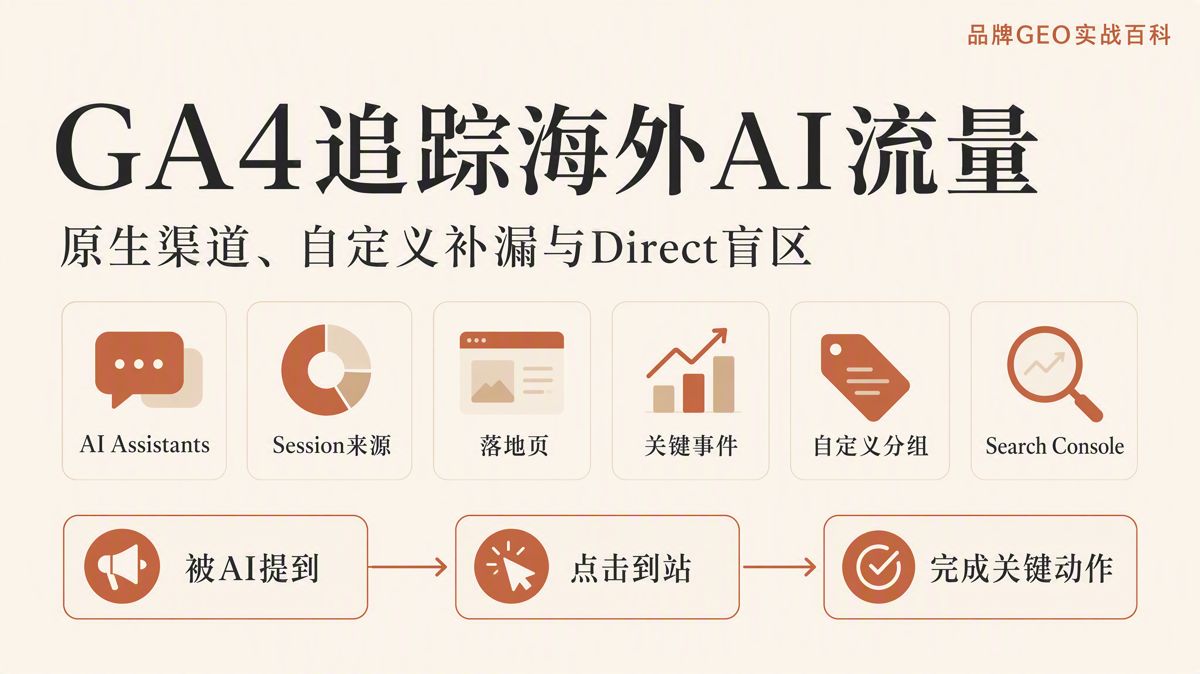
Google Analytics 4 (GA4) now automatically identifies visits coming from AI assistants. If you are still following 2025 tutorials that tell you to dump every AI domain into a single regex rule above Referral, your workflow needs an update.
A reliable AI traffic measurement workflow follows four steps:
- Check GA4's native
AI Assistantschannel first. - Evaluate traffic quality by specific AI source and landing page.
- Build a custom channel group only when native detection leaves identifiable gaps.
- Triangulate unidentifiable visits separately—without dumping all Direct traffic into an AI bucket.
This approach keeps your baseline aligned with official Google Analytics definitions while giving your team the flexibility to track custom sources.
What AI Traffic Does GA4 Automatically Identify?
On May 13, 2026, Google Analytics rolled out a native AI Assistants channel. When a visitor arrives with an identifiable referrer that matches Google's maintained list of AI assistants, GA4 handles the session with three rules:
- Sets Medium to
ai-assistant - Sets Campaign to
(ai-assistant) - Classifies the visit into the
AI Assistantsdefault channel group
Because of this update, the Default Channel Group displays a portion of your AI traffic out of the box, with no custom regex required. See the Google Analytics release notes.
Official recognized sources include ChatGPT, Gemini, DeepSeek, Copilot, and Grok. See the GA4 default channel group documentation.
Keep two key boundaries in mind:
First, Google maintains this source list internally. If a specific platform does not appear in official examples, that does not guarantee your site receives zero traffic from it—it may simply not be classified yet.
Second, Google AI Overviews and AI Mode do not belong to the AI Assistants channel. These generative search features belong to organic search and must be analyzed using Google Search Console, rather than lumped together with conversational assistants like ChatGPT or Gemini in GA4.
Step 1: Check Whether Native AI Assistants Data Exists
Navigate to:
Reports → Acquisition → Traffic acquisition
Set the primary dimension to:
Session default channel group
Search for:
AI Assistants
If data appears, add Session source / medium as a secondary dimension. This lets you inspect which specific AI platforms generated the sessions, rather than viewing a single aggregated total.
Make sure you are looking at the right acquisition report:
Traffic acquisitionuses a Session scope: "Where did this specific visit come from?"User acquisitionuses a First User scope: "How did this user originally discover the website?"
A session represents an individual period of user engagement. First user records the acquisition source of a first-time visitor. If a returning visitor re-enters your site through an AI assistant, that visit registers under Session reporting, but their original acquisition channel remains unchanged.
For routine AI performance tracking, prioritize Traffic acquisition. Reserve User acquisition for understanding top-of-funnel customer discovery. See the GA4 acquisition reports documentation.
If AI Assistants does not appear in your default channel report, expand your date range. Then check Session source / medium inside Referral and Direct. An empty channel does not necessarily mean your setup is broken; it often just means no identifiable AI referrer occurred during that period.
Step 2: Break Down Specific Sources, Landing Pages, and Engagement
Once you verify that AI traffic exists, look beyond raw session counts. Combine source platforms, entry points, and downstream actions into a unified view.
Start by splitting traffic using Session source / medium, then add Landing page + query string. A landing page is the initial page viewed during a session, and the query string captures appended URL parameters.
This breakdown answers three practical questions:
- Which AI engine sent the visitor?
- Which page captured the click?
- Did the visitor complete high-value actions after arriving?
Relying solely on session volume gives no visibility into traffic intent. Track these engagement metrics alongside visits:
Engagement rate: The percentage of sessions that were engaged visits.Key events: Actions flagged as critical business conversions.Session key event rate: The percentage of sessions that resulted in at least one key event.
Build two dedicated views:
- AI Source Report: Compare Sessions, Engaged sessions, and Key events across platforms to evaluate audience quality.
- Landing Page Report: Compare Sessions, Engagement rate, and Key events across URLs to see which content assets successfully convert AI citations into site engagement.
If your AI traffic volume is still small, evaluate trends on a weekly or monthly cadence. Making strategic changes based on single-day spikes of two or three visits creates unnecessary noise.
Step 3: Decide If You Need a Custom Channel Group
The arrival of native AI tracking does not make custom channel groups obsolete. Setting up custom definitions remains valuable under three conditions:
- Google's native list does not yet capture an AI engine appearing in your logs.
- Your marketing team needs unified naming conventions across multi-brand properties.
- You need retroactive, custom segmentation rules across historical data.
Standard GA4 properties support up to 2 custom channel groups, with up to 50 channels per group. Creating or editing them requires Editor permission or higher. See the custom channel groups documentation.
Navigate to:
Admin → Data display → Channel groups
Copy your Default Channel Group and create a new group named AI Assistants Custom. Set the condition field to Source and the matching operator to matches regex.
A regular expression matches string patterns within your source dimensions. You can start with this focused rule and refine it as new platforms appear in your logs:
^.*(chatgpt\.com|openai\.com|claude\.ai|perplexity\.ai|gemini\.google\.com|copilot\.microsoft\.com|grok\.com|x\.ai|deepseek\.com).*$
Do not treat this expression as permanent. Export your Session source data regularly to identify missing platforms or false matches, then update the rule.
Avoid overly broad expressions such as .*ai.*. Broad rules capture unrelated websites containing "ai" in their domain names and corrupt your reporting.
Place Custom AI Rules Above Referral
GA4 evaluates channel rules from top to bottom. A session gets assigned to the first channel rule it satisfies.
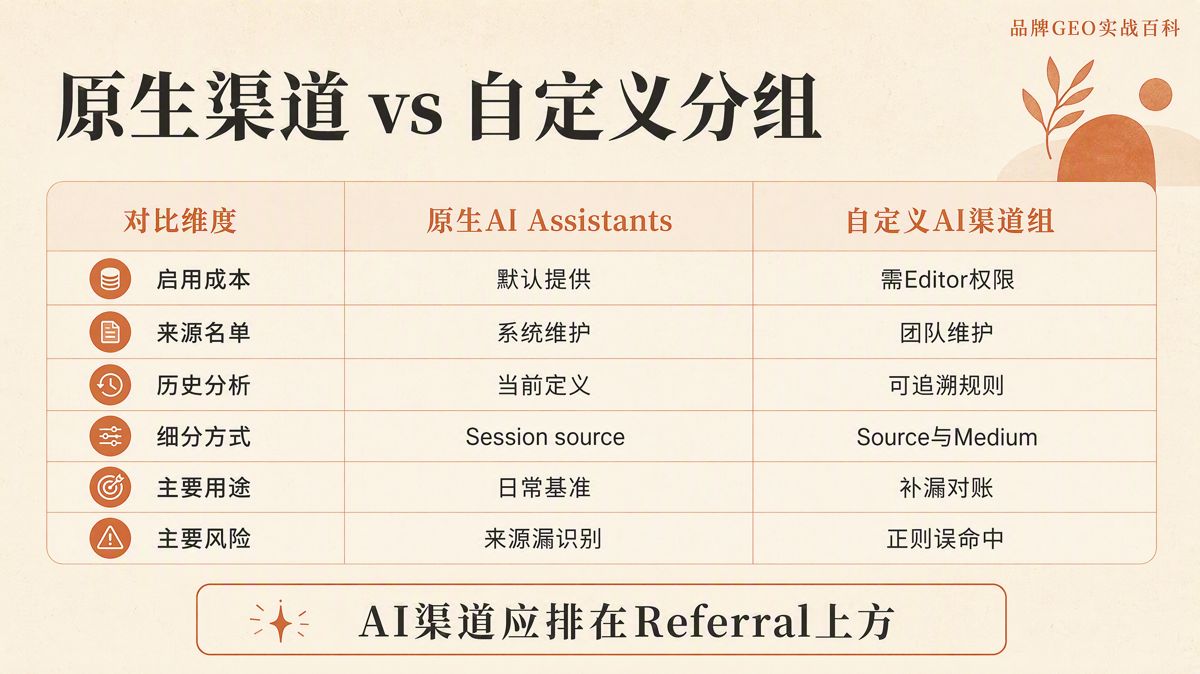
Always place your custom AI channel above Referral in the evaluation order. If it sits below Referral, visits carrying an AI domain referrer will match Referral first, leaving your custom AI channel empty. See the custom channel groups documentation.
Additionally, on June 11, 2026, Google Analytics rolled out Source Group, which normalizes common platform sources (such as grouping various ChatGPT and Perplexity domains) and supports historical backfills. Take this into account when auditing source integrity. See the Google Analytics release notes.
Native vs. Custom AI Channels: How to Split Responsibilities
| Evaluation Criterion | Native AI Assistants | Custom AI Channel Group |
|---|---|---|
| Setup Effort | Available automatically; no regex required | Requires Editor permissions and routine maintenance |
| Source Coverage | Maintained and updated by Google | Maintained internally by your marketing team |
| Historical Analysis | Follows GA4's default historical rollout | Applies custom rules retroactively across reports |
| Rule Granularity | Filtered via secondary dimensions like Session source | Filterable by Source, Medium, Campaign, and custom fields |
| Core Use Case | Baseline reporting and executive dashboards | Edge-case auditing, internal reconciliation, custom naming |
| Primary Risk | Unlisted engines fall into Referral or Direct | Overly broad regex, ordering errors, stale definitions |
You do not need to choose between them.
Use native AI Assistants as your standardized external baseline to maintain consistency with platform documentation. Keep a custom channel group for internal diagnostic audits and tracking emerging tools.
If numbers diverge between the two views, review the underlying Session source values to determine whether the difference stems from Google's list, your regex pattern, or channel rule order.
Why GA4 Tracking Always Has AI Blind Spots
The native AI channel relies on two prerequisites: the incoming visit must pass an identifiable referrer header, and that referrer must match Google's internal list.
When a visitor clicks a citation in an AI chat interface that strips the referrer header, GA4 cannot determine the traffic source. These sessions land in (direct) / (none). However, Direct traffic is not synonymous with AI traffic.
In GA4, (direct) / (none) simply indicates missing attribution data. Stripped UTM parameters, protocol downgrades during redirects, bookmarks, offline link clicks, and privacy ad blockers all create Direct traffic. See the GA4 Direct traffic documentation.
A rise in Direct traffic does not prove AI growth. Do not treat raw Direct traffic as a proxy for AI performance.
Instead, triangulate performance using three complementary signals:
- Add a "How did you hear about us?" self-reported field to lead generation forms.
- Tag links in controlled AI assistants or partnered brand activations with structured UTM parameters.
- Review AI landing pages, shifts in Direct volume, and form attribution side by side each month.
These data points serve as qualitative evidence; they do not alter GA4's programmatic session attribution.
When using UTM parameters on owned links, always define utm_source, utm_medium, and utm_campaign. Missing parameters often result in (not set) values in acquisition reports.
UTM tagging works only on links your team controls, such as dedicated GPT actions, company prompts, or affiliate collateral. Autonomous organic citations generated by LLMs rely entirely on HTTP referrers and platform detection lists.
How to Track Google AI Overviews and AI Mode
GA4 excludes Google AI Overviews and AI Mode from the AI Assistants channel. Because they operate as features within Google Search, you must track them through Google Search Console.
In June 2026, Google Search Console began rolling out a dedicated Generative AI performance report. It provides impression and click data for AI Overviews and AI Mode, broken down by landing page, country, device, and date. See the Search Console Generative AI report documentation.
Monitor these environments across two systems:
- Use Google Search Console to track generative search visibility (impressions) and discover which landing pages surface inside AI responses.
- Use GA4 to track post-click metrics once users land on your website (engagement rate, time, and key events).
Do not divide GA4 sessions by Search Console impressions to calculate a crude conversion rate. The tools use different counting methodologies and data scopes.
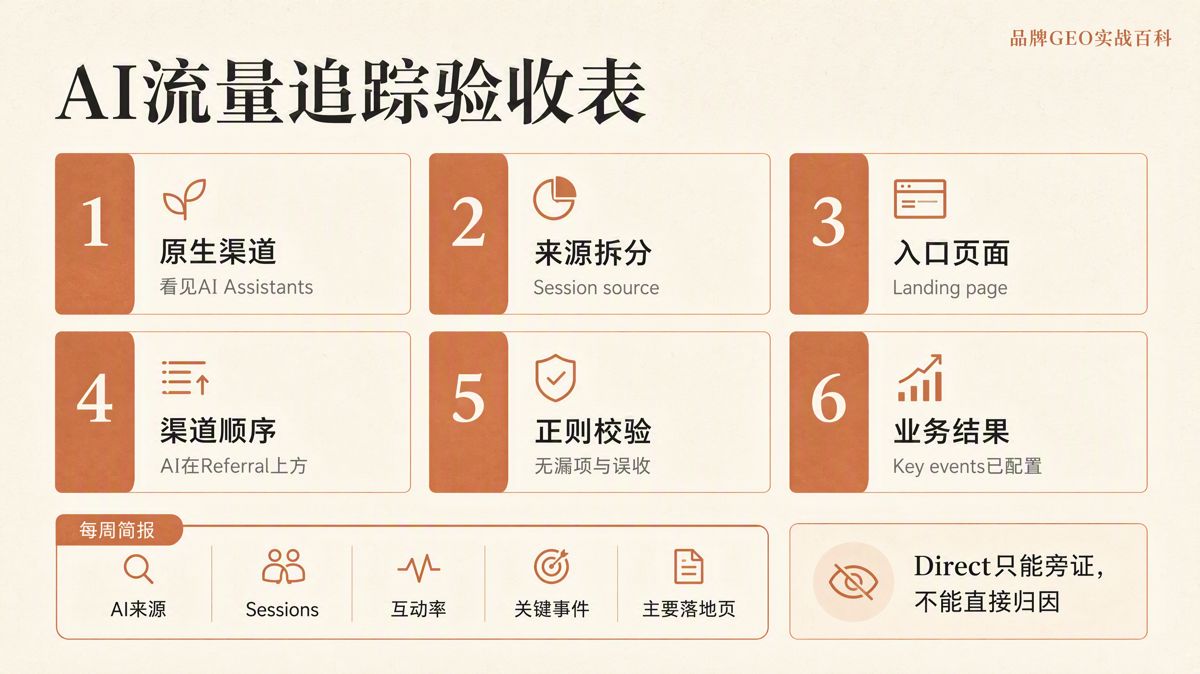
The 7-Day Implementation Checklist
After setting up your tracking framework, let the data run for seven days, then verify these six points:
AI Assistantsdisplays verified session data in Traffic acquisition.Session source / mediumsplits visits into identifiable AI platforms.Landing page + query stringshows the entry pages capturing AI visits.- Your custom AI channel sits above Referral in channel group ordering.
- Your regex conditions exclude non-AI domains and generic matching terms.
- Key events reflect genuine commercial actions (form submissions, sign-ups, calls).
Keep your weekly reporting table focused on five core columns:
- AI Source
- Sessions
- Engagement Rate
- Key Events
- Top Landing Pages
During monthly reviews, cross-reference these numbers with changes in Direct traffic, self-reported lead attribution, and Search Console Generative AI impressions.
This structure covers the complete discovery journey: whether your brand was cited by an AI engine, whether users clicked through to your site, and whether they converted upon arrival. Impression, visit, and conversion metrics measure distinct stages—keep them separated to get an accurate view of performance.
Frequently Asked Questions
Do you still need to create a custom AI channel in GA4 manually?
Most properties should start with the native AI Assistants channel released in May 2026. Only build a custom channel group if native detection misses emerging AI engines, your team requires unified naming conventions, or you need to apply historical segmentation rules.
Why isn't AI Assistants showing up in the default channel group?
Your site may not have received traffic with an identifiable AI referrer during the selected date range, or the visits were misclassified. Expand the date range first, then check Referral and Direct under Session source / medium.
Why doesn't the AI Assistants channel include Google AI Overviews?
Google explicitly excludes AI Overviews and AI Mode from the AI Assistants channel. Because they are part of Google Search, impressions and clicks must be monitored in Google Search Console, while on-site post-click behavior is analyzed in GA4.
How often should you update custom regex rules for AI sources?
There is no fixed schedule. Export Session source values monthly to spot emerging referrers, gaps, or false positives. Update rules when new platforms scale, and document rule change dates to keep reporting consistent.
Does an increase in Direct traffic prove that AI traffic is growing?
No. In GA4, (direct) / (none) simply indicates missing attribution data. Missing UTMs, redirect parameter stripping, offline document clicks, and ad blockers all produce Direct visits. Direct traffic is only circumstantial evidence, not verified AI traffic.
Should you analyze AI traffic using Sessions or First User metrics?
Use Session dimensions for day-to-day traffic evaluation, as they show the origin of each individual visit. Use First User dimensions only to analyze how new visitors originally discovered your website.
Can UTM parameters resolve all untracked AI referral visits?
No. UTMs only work on links you create and control, such as custom GPT actions, partnerships, or promotional campaigns. Organic citations generated autonomously by LLMs cannot be controlled with UTMs and still depend on referrer data.
Which metrics matter most when evaluating AI traffic?
Start with Sessions to evaluate volume, then examine Engagement rate and Key events to assess visitor intent. Finally, review Landing page data to see which content captures AI clicks. If volume is low, analyze trends weekly or monthly rather than making decisions on single-day fluctuations.
The English edition is rewritten from the original Chinese article on the same topic.

Starbox AI is an AI marketing company based in Hangzhou, China. This article draws on Starbox project work. Please credit the source when quoting.
Related reading
 GEO Guide
Why AI Marketing Vendor Quotes Vary 10x: A 4-Step Vetting Checklist
Evaluate AI marketing proposals by delivery actions, not slide decks. Audit source infrastructure, fact cleaning, and clean-environment testing.
Oct 22, 2026 · 6 min read
GEO Guide
Why AI Marketing Vendor Quotes Vary 10x: A 4-Step Vetting Checklist
Evaluate AI marketing proposals by delivery actions, not slide decks. Audit source infrastructure, fact cleaning, and clean-environment testing.
Oct 22, 2026 · 6 min read
 GEO Guide
Spotting GEO Scams: What Actually Drives AI Recommendations?
Automated AI ranking promises violate how LLMs work. Real AI recommendations rely on authoritative, structured facts across trusted public sources.
Oct 22, 2026 · 4 min read
GEO Guide
Spotting GEO Scams: What Actually Drives AI Recommendations?
Automated AI ranking promises violate how LLMs work. Real AI recommendations rely on authoritative, structured facts across trusted public sources.
Oct 22, 2026 · 4 min read
 GEO Guide
How to Measure Your Brand's AI Visibility with a Spreadsheet
You do not need expensive software to track AI recommendations. A three-tier prompt framework and a simple spreadsheet can score your brand visibility in half a day.
Oct 21, 2026 · 6 min read
GEO Guide
How to Measure Your Brand's AI Visibility with a Spreadsheet
You do not need expensive software to track AI recommendations. A three-tier prompt framework and a simple spreadsheet can score your brand visibility in half a day.
Oct 21, 2026 · 6 min read