
How to Track Traffic from Chinese AI Platforms in GA4

The short answer
Relying on static domain regex lists won't accurately track AI traffic in GA4. Here is a verifiable six-step framework using real data, UTMs, and server logs.
You cannot confirm whether AI recommendations are driving users to your website simply by checking if an AI product's name appears in Google Analytics 4 (GA4).
GA4 only records the source, referring URL, UTM parameters, and event data passed by the browser and your tracking configuration. When referral data is omitted or stripped during transit, GA4 will not guess whether the visitor engaged with an AI assistant earlier in their journey.
Chinese AI platforms—such as Doubao (ByteDance's AI assistant), Kimi, and Baidu's Ernie—operate across different native app builds, embedded web views, redirect chains, and privacy protocols. There is no definitive, static list of Chinese AI referral domains. The objective should not be assembling a one-time domain list, but setting up a reliable, verifiable process that you can audit and update over time.
Understand What GA4 Can and Cannot See
GA4 provides two primary fields for tracking arrival paths, but they answer different questions.
Session source / medium explains which source and channel GA4 credited for the visit. It is intended for session-level entry analysis and should be reviewed within the Traffic acquisition report. When analyzing traffic generated by AI tools, always use session-scoped source dimensions rather than First user source. For reference, review Google's guides on GA4 traffic-source dimensions and the difference between user acquisition and traffic acquisition.
page_referrer records whether the browser passed the URL of the previous page to GA4. It is an automatically collected parameter that helps identify the referring web address. However, this parameter is frequently missing or altered when visitors navigate from native mobile apps, privacy-focused browsers, intermediate redirect scripts, or non-referring protocols. See Google's documentation on automatically collected page_referrer in GA4.
These two dimensions cannot be merged into a single metric or used interchangeably.
A referral from an AI engine might pass a clean, identifiable domain, or it might get recorded as direct / (none). It could also be misattributed to an intermediate shortener or bridge page.
A direct / (none) session does not mean the user manually typed your domain into their address bar. It simply indicates that GA4 received no usable referrer information. Missing UTMs, parameter-stripping 301/302 redirects, URL shorteners, and ad blockers will all push traffic into the direct bucket. Learn more in Google's guide to GA4 direct traffic.
GA4 only reflects the signals your collection setup manages to capture. It cannot reconstruct an untracked user journey.
Step 1: Verify GA4 Data Collection First
Before investigating AI traffic, rule out baseline tracking errors on your site.
Ensure your site runs the Google tag directly or loads GA4 via Google Tag Manager (GTM). A properly deployed Google tag in GTM handles automatically collected events, enhanced measurement, and custom parameter mapping. Consult Google's guide on how to set up GA4 in GTM.
Run this validation sequence:
- Create a test link to your target landing page using distinct test UTM parameters.
- Click the test link to navigate to the site.
- Open the GA4 Realtime report to verify that the source, medium, and campaign appear accurately.
- Open DebugView in GA4 to confirm that standard and custom conversion events (such as form submissions or phone number clicks) fire as expected.
The Realtime report monitors activity across the preceding 5-minute and 30-minute windows, making it ideal for checking ingestion. However, its attribution processing is limited. Base formal reporting on Traffic acquisition reports and Explorations. Read more about the GA4 Realtime report.
If your conversion events use custom parameters, register them as custom dimensions or metrics so they populate in standard reports. Review Google's reference on GA4 event parameters.
Step 2: Export Real Sources from Your Own Traffic
Do not guess which domains belong to AI platforms. Start by examining the data your site has already collected.
Navigate to Reports > Acquisition > Traffic acquisition. Set the primary dimension to "Session source / medium" and set the date range to the last 30 days (or longer if your business operates on extended sales cycles). See Google's overview of the GA4 Traffic acquisition report.
Next, navigate to Explore > Free-form and create a report with the following configuration:
- Dimensions: Session source / medium, Landing page + query string, Page referrer.
- Metrics: Sessions, Engaged sessions, Key events.
- Filters: Restrict to key landing pages; exclude internal testing IP addresses and confirmed spam.
GA4 Explorations allow you to combine custom dimensions, metrics, filters, and segments, and export the dataset as a CSV or TSV for offline auditing. Learn how to configure GA4 Explorations.
Once exported, do not assume every unfamiliar host originates from an AI engine. Screen each candidate value against these four criteria:
- Does this string appear consistently in Session source or
page_referrer? - Can you replicate the arrival path under controlled test conditions?
- Could the referrer be an intermediate link shortener, a tracking redirect, or a standard web page citation?
- Does the domain pattern remain consistent across distinct visitor sessions?
Only values that pass this screening should be added to your custom channel rules.
Step 3: Build Custom AI Channel Rules from Verified Data
Once you have verified your incoming referral strings, configure a Custom Channel Group in your GA4 property settings. Add a new channel named "AI Assistants" and position it above Referral in the channel hierarchy. This ensures confirmed AI sources are classified as AI assistants before hitting standard referral rules.
Maintain an internal audit sheet containing these five fields:
| Field | Purpose |
|---|---|
| Actual Source Value | The exact string appearing in GA4 or page_referrer |
| Evidence Source | The specific GA4 report, exploration, or export file where it was found |
| First Observed Date | When the source was first detected |
| Last Verified Date | Confirmation that the domain pattern remains active |
| Owner | The team member responsible for auditing and updates |
Only add values to your regex condition if they have been observed on your domain and verified manually. Schedule a monthly review to inspect newly observed sources, deprecate retired domains, and fix misclassifications.
Google provides regex examples for AI assistants in its channel documentation, noting that expressions must be maintained as referring URLs change. Review Google's guide to GA4 custom channel groups.
Keep in mind that Google's examples do not cover regional Chinese AI platforms, nor do they guarantee that GA4 will catch every AI-driven visit. Public domain lists found on forums can serve as initial investigation leads, but never apply them to production channel groups without testing.
Step 4: Standardize UTM Parameters on Controllable Links
A UTM tag is a set of query parameters appended to URLs to enforce attribution. Where you control the link destination, apply consistent UTM naming standards.
Relevant placements include:
- Co-marketing and sponsored content links;
- Link cards in branded AI agents and bots built inside Chinese AI platforms;
- Resource links delivered through automated customer support responses.
Use a standardized pattern such as:
?utm_source=ai_assistant&utm_medium=referral&utm_campaign=geo_content
Enforce lower-case conventions across your team, and maintain an internal naming dictionary for source, medium, and campaign. Always test destination links prior to deployment to ensure redirects do not strip appended query strings.
GA4 reports utm_source, utm_medium, and utm_campaign inside the Traffic acquisition report, and values are strictly case-sensitive. ai_assistant and AI_Assistant are processed as two distinct sources. Use Google's GA4 Campaign URL Builder to create clean links.
Note that UTM tags only solve tracking for links you manage. They cannot restore referrers lost from organic AI citations, nor do they prove that a user visited solely because an AI assistant recommended your brand.
Step 5: Verify Actual Requests in Server Logs
GA4 records data processed by client-side browser tags. Server access logs record whether HTTP requests actually arrived at your hosting infrastructure.
Configure your web servers to log at least:
- Request timestamp;
- Landing URI path and query strings;
- HTTP Referer header;
- HTTP status code;
- User-Agent string.
During audits, match server log timestamps, landing page URLs, and incoming UTM strings against corresponding session timestamps in GA4.
When an HTTP Referer header is present in the server log, it provides clear evidence of the referring address passed by the client. If the Referer header is blank, it simply indicates that the client omitted the header—it does not disprove that the visitor originated from an AI recommendation.
Server logs verify technical delivery; they do not measure user intent.
If you plan to ingest offline conversions or backend CRM stages into GA4, use the GA4 Measurement Protocol. Note that Google designed the Measurement Protocol to augment web and app telemetry, not to replace standard tag-based tracking. Review Google's documentation on the GA4 Measurement Protocol.
Step 6: Connect AI Traffic to Business Conversions
Tracking inbound traffic volume has little value if you cannot see what users do after arriving.
Deploy event tracking via GTM or on-page code for business-critical actions:
- Submitting an inquiry or lead form;
- Clicking a phone number link;
- Copying contact handles;
- Downloading product whitepapers or resources.
Once tested in DebugView, designate these conversion events as Key Events in your GA4 property settings.
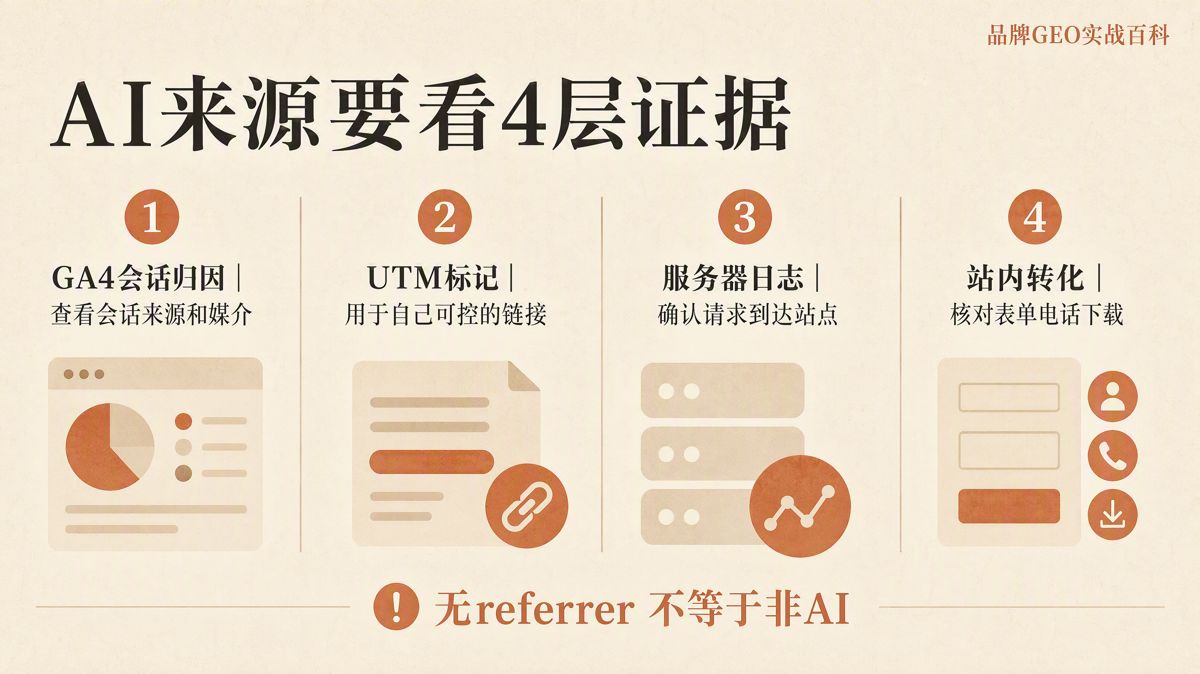
Your analytics dashboard should cross-reference four layers of evidence:
| Evidence Type | Core Question Answered | Typical Fields & Tools | What It Cannot Prove Alone |
|---|---|---|---|
| GA4 Session Attribution | Which channel received GA4 attribution? | Session source / medium, Campaign | Fails to capture AI-influenced users with missing referrers |
| UTM Parameters | What tag was applied to controllable links? | source, medium, campaign |
Does not cover organic citations or third-party links |
| Server Logs | Did the HTTP request reach the server? | Request URL, Referer, Status Code, User-Agent | A blank Referer does not prove the visit wasn't from AI |
| Onsite Conversions | What did the user accomplish on-page? | Forms, phone clicks, copy events, downloads | Cannot restore upstream source data that was lost |
When evaluating campaign performance, review the session source, match it against the landing page and server log, and verify the downstream Key Event. Attribution claims are only credible when these four layers align.
The Takeaway: Focus on Process, Not Static Domain Lists
Chinese AI platforms continuously update their domain routing, native app webviews, and privacy behaviors. Relying on an unverified, static regex list will inevitably produce misleading metrics.
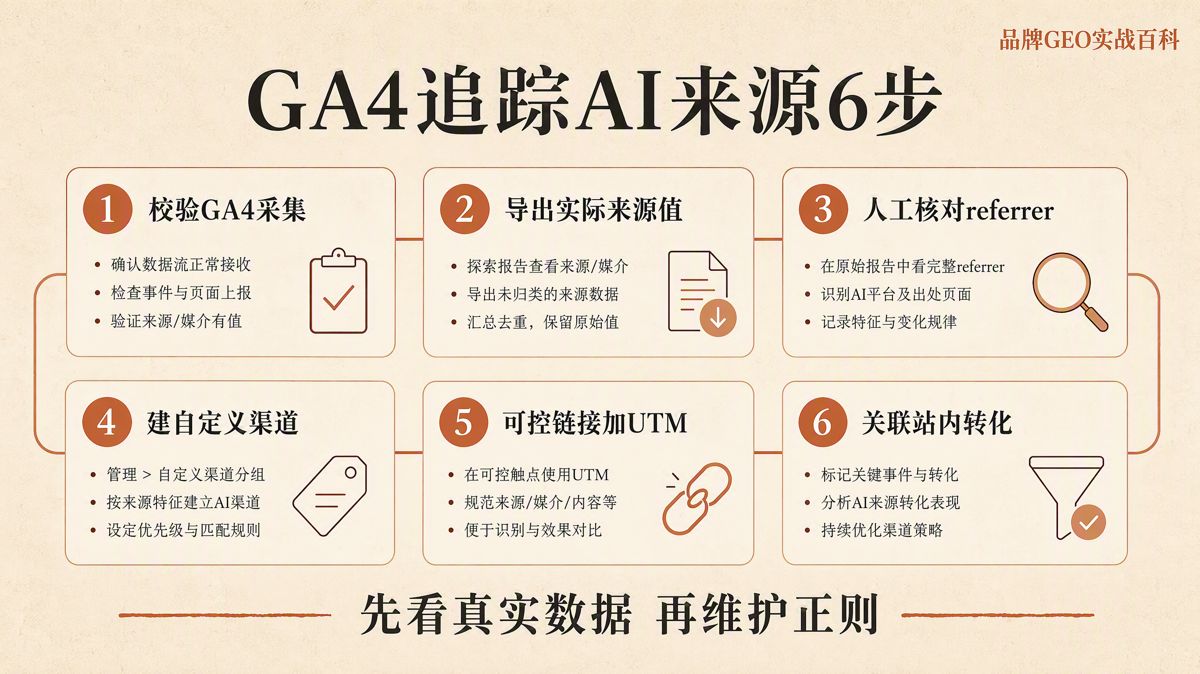
A defensible tracking framework relies on six connected steps:
- Validate GA4 data collection and conversion event triggers;
- Export and inspect the actual session sources and referrers captured by your site;
- Manually audit unknown referrers before adding them to custom channel rules;
- Enforce strict UTM naming conventions on links within your control;
- Cross-reference questionable traffic against raw web server access logs;
- Tie incoming AI visits directly to verified onsite Key Events.
This process will not capture every AI-assisted visit, but it guarantees that the metrics you report to leadership are grounded in verifiable technical evidence.
FAQ
Can GA4 identify all AI referral traffic?
No. GA4 can only process the source, page_referrer, UTM, and event data it actually receives. In-app browsers, strict privacy policies, stripped referrer headers, and redirects can all cause the source to be lost or altered.
Does direct / (none) always mean the user typed the URL into the address bar?
Not necessarily. It simply means GA4 received no identifiable referrer. Missing UTM parameters, redirects that drop query strings, short links, and ad blockers can all cause a session to be categorized as direct.
What is the difference between session source and page_referrer?
Session source is GA4's attribution outcome for a session, while page_referrer is the URL of the previous web page passed by the browser. You can cross-reference both during investigations, but they are distinct fields that serve different purposes.
Can I just copy a regex list of Chinese AI domains from the internet?
We do not recommend it. There is no official or stable master list of Chinese AI platform referral domains. You should export actual session sources and page_referrer values from your own GA4 reports, verify them manually, and build your custom regex rules from there.
Do UTM parameters solve all AI tracking challenges?
No. UTM tags only work on links you directly control. They cannot track organic citations in AI answers, in-app links where parameters are stripped, or visits where redirects discard the query string.
Why do Realtime reports show different results from Traffic acquisition reports?
The Realtime report is designed for immediate monitoring and has limited attribution capabilities, making it best for verifying that tracking tags fire. Formal traffic attribution should always rely on Traffic acquisition reports and GA4 Explorations.
If a server log has no Referer header, does that prove the visit did not come from AI?
No. A missing Referer header only means the client or intermediate network did not provide that field in the HTTP request. You must cross-check the landing URL, UTM tags, GA4 session records, and onsite behavior before drawing conclusions.
How often should custom AI channel rules be reviewed?
Review your rules monthly to identify new referring domains, remove obsolete ones, and fix misclassifications. You should also run an audit whenever an AI platform updates its app linking behavior or when you modify your site's redirect logic.
Official References
- GA4 traffic-source dimensions
- Difference between user acquisition and traffic acquisition
- GA4 Traffic acquisition report
- Automatically collected page_referrer in GA4
- GA4 direct traffic
- GA4 Campaign URL Builder
- GA4 Realtime report
- GA4 Explorations
- GA4 custom channel groups
- Set up GA4 in GTM
- GA4 event parameters
- GA4 Measurement Protocol
The English edition is rewritten from the original Chinese article on the same topic.

Starbox AI is an AI marketing company based in Hangzhou, China. This article draws on Starbox project work. Please credit the source when quoting.
Related reading
 GEO Guide
Why AI Marketing Vendor Quotes Vary 10x: A 4-Step Vetting Checklist
Evaluate AI marketing proposals by delivery actions, not slide decks. Audit source infrastructure, fact cleaning, and clean-environment testing.
Oct 22, 2026 · 6 min read
GEO Guide
Why AI Marketing Vendor Quotes Vary 10x: A 4-Step Vetting Checklist
Evaluate AI marketing proposals by delivery actions, not slide decks. Audit source infrastructure, fact cleaning, and clean-environment testing.
Oct 22, 2026 · 6 min read
 GEO Guide
Spotting GEO Scams: What Actually Drives AI Recommendations?
Automated AI ranking promises violate how LLMs work. Real AI recommendations rely on authoritative, structured facts across trusted public sources.
Oct 22, 2026 · 4 min read
GEO Guide
Spotting GEO Scams: What Actually Drives AI Recommendations?
Automated AI ranking promises violate how LLMs work. Real AI recommendations rely on authoritative, structured facts across trusted public sources.
Oct 22, 2026 · 4 min read
 GEO Guide
How to Measure Your Brand's AI Visibility with a Spreadsheet
You do not need expensive software to track AI recommendations. A three-tier prompt framework and a simple spreadsheet can score your brand visibility in half a day.
Oct 21, 2026 · 6 min read
GEO Guide
How to Measure Your Brand's AI Visibility with a Spreadsheet
You do not need expensive software to track AI recommendations. A three-tier prompt framework and a simple spreadsheet can score your brand visibility in half a day.
Oct 21, 2026 · 6 min read