
How to Configure GPTBot and ClaudeBot in robots.txt

The short answer
Don't allow or block all AI crawlers blindly. Separate training crawlers from AI search bots and user requests to preserve your brand's AI search visibility.
When website owners first look at AI web crawlers, the initial impulse is often binary: should we allow everything, or block everything?
A blanket rule rarely works. Web crawlers—automated programs that visit websites and read their pages—arrive at your server for three completely different purposes: training AI models, powering real-time search results, or answering a specific user query.
Websites communicate their crawling preferences using a robots.txt file placed in the root directory (such as https://www.example.com/robots.txt). This plain-text file tells compliant crawlers which parts of the site they may access.
In GEO (Generative Engine Optimization—optimizing your web content for visibility in generative AI search), one core distinction matters above all: allowing AI search bots does not mean you have to surrender your content for model training.
This guide breaks down the six core User-agent tokens used by OpenAI and Anthropic across training, search, and user requests, helping you configure your rules with precision.
If your goal is to stay discoverable in ChatGPT and Claude search while keeping your content out of foundational model training datasets, use this baseline:
- OpenAI: Allow
OAI-SearchBot, disallowGPTBot. - Anthropic: Allow
Claude-SearchBot, allow or reviewClaude-User, disallowClaudeBot. - ChatGPT-User: Review separately. It is triggered by direct user actions, and OpenAI explicitly notes that standard
robots.txtdirectives may not apply to it.
Three Permission Questions to Answer First
Before copying code snippets into your production configuration, bring your content, legal, security, and business stakeholders together to answer three questions.
1. Do you allow your public content to train foundation models?
Model training uses web data to improve the core capabilities of generative AI models.
OpenAI uses GPTBot to collect web data that may be used to train its models. Anthropic uses ClaudeBot for the same purpose.
If your organization does not want its content used for model training, disallow both crawlers. Disallowing training bots does not force you to forfeit your presence in AI search.
2. Do you want your content indexed by AI search engines?
OpenAI uses OAI-SearchBot to index content for search features in ChatGPT. Anthropic uses Claude-SearchBot to improve the relevance and accuracy of search results inside Claude.
Allowing these search crawlers simply tells the platforms that your site does not block them. It preserves the opportunity for your pages to enter their search indexes. It does not guarantee that your pages will be crawled, indexed, displayed, or cited.
OpenAI explicitly states that OAI-SearchBot and GPTBot operate independently. You can permit search indexing while blocking training crawlers. See the OpenAI crawler documentation for reference.
3. Do you allow AI systems to fetch pages in response to live user prompts?
When a user asks a specific question inside ChatGPT or Claude that requires real-time information, the system may fetch a specific URL on demand. These requests are identified as ChatGPT-User and Claude-User.
Anthropic confirms that site owners can manage Claude-User through robots.txt. Blocking it may prevent Claude from retrieving page content requested directly by users.
OpenAI handles ChatGPT-User differently. Because these visits are triggered by deliberate user actions rather than broad automated crawls, OpenAI notes that standard robots.txt rules may not apply. ChatGPT-User also has no role in determining whether a page appears in ChatGPT search results—that is handled strictly by OAI-SearchBot. Learn more in the Anthropic bot documentation.
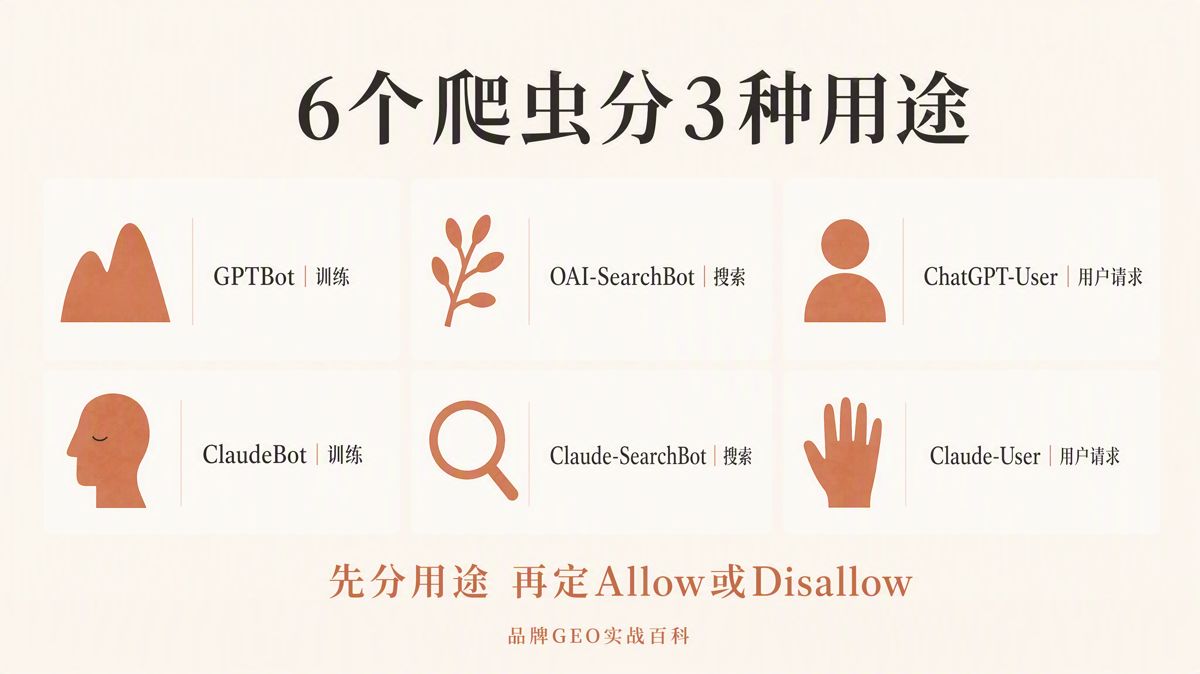
The Six AI User-Agents Explained
| Platform | User-agent | Official Purpose | Primary Impact of Disallowing |
|---|---|---|---|
| OpenAI | GPTBot |
Crawls content potentially used to train foundation models | Signals that your content should not be used in model training |
| OpenAI | OAI-SearchBot |
Powers website discovery and citations in ChatGPT search | Your site will not appear in ChatGPT search answers, though it may still appear as a navigational link |
| OpenAI | ChatGPT-User |
Fetches pages on behalf of direct user prompts or Custom GPT actions | robots.txt rules may not apply; cannot be relied upon as an access control mechanism |
| Anthropic | ClaudeBot |
Crawls content potentially used to train Claude models | Excludes future web materials from Anthropic's training pipeline |
| Anthropic | Claude-SearchBot |
Improves the relevance and accuracy of Claude search results | May reduce your site's visibility and answer accuracy in Claude search |
| Anthropic | Claude-User |
Fetches web pages on demand when a user asks a question in Claude | Claude may be unable to retrieve web page content requested by users |
Allowing GPTBot and ClaudeBot is not a prerequisite for appearing in AI search engines. Training crawler permissions are completely separate from search visibility permissions.
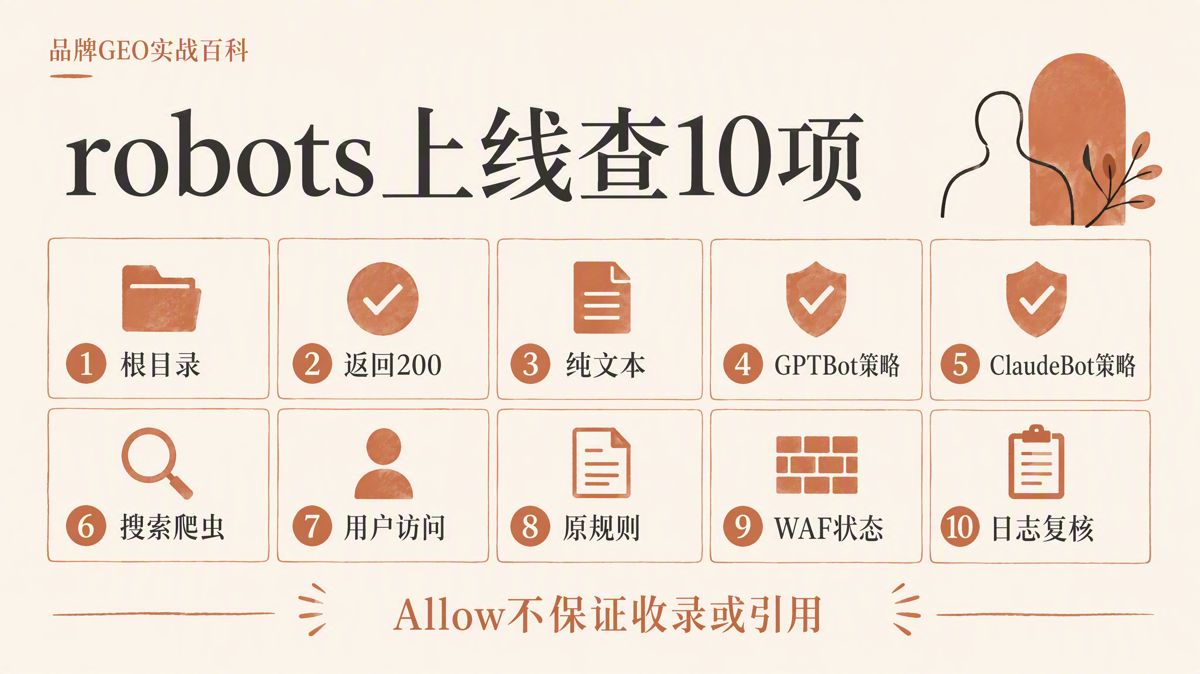
Six Rules to Know Before Editing robots.txt
1. Evaluate training, search, and user requests separately
These three activities serve different business functions. Do not allow training crawlers by default simply because you want search visibility. Conversely, do not block search engines simply because you want to protect your intellectual property from model training.
2. "Allow" does not guarantee inclusion
Writing Allow: / grants crawler permission to access your paths. It tells the bot that it is not blocked by your exclusion policy. It does not guarantee that the platform will crawl, index, summarize, or cite your content.
3. "Disallow" is not a security measure
Disallow: / asks compliant bots not to access your site. It is an expression of preference, not access control. It does not encrypt data, enforce authentication, or stop non-compliant scrapers.
RFC 9309, the internet standard for the Robots Exclusion Protocol, explicitly states that robots rules cannot replace application security. Sensitive pages must always be protected using logins, role-based access controls, and network firewalls.
4. robots.txt applies per host
A host refers to a specific subdomain entry point. example.com, www.example.com, and help.example.com are distinct hosts. Even if they belong to the same business, each requires its own separate robots.txt file.
5. Crawl-delay is not a universal standard
The Crawl-delay directive asks crawlers to wait a specified number of seconds between requests. While Anthropic supports this non-standard extension, it is not part of RFC 9309. You cannot assume OpenAI or other crawlers will honor it.
6. Treat ChatGPT-User as an exception
Adding an Allow or Disallow rule for ChatGPT-User in robots.txt documents your preference, but it does not guarantee that live user requests will be permitted or blocked. OpenAI's official stance is that because these fetches are user-initiated, robots.txt restrictions may not apply.
Configuration 1: Allow Search, Block Training (Recommended)
If you want your content cited in AI search results while keeping foundation models from training on your text, start with this baseline:
User-agent: OAI-SearchBot
Allow: /

User-agent: GPTBot
Disallow: /

User-agent: ChatGPT-User
Allow: /

User-agent: Claude-SearchBot
Allow: /

User-agent: Claude-User
Allow: /

User-agent: ClaudeBot
Disallow: /

Sitemap: https://www.example.com/sitemap.xml
This configuration permits search crawlers from both OpenAI and Anthropic, blocks both training crawlers, and allows user-prompt fetches. Keep in mind that OpenAI may handle ChatGPT-User outside standard robots rules.
Replace the Sitemap URL with your actual sitemap path.
Always merge these directives into your existing robots.txt. Do not overwrite rules for Googlebot, Bingbot, internal search pages, admin panels, shopping carts, or test directories.
Configuration 2: Allow Both Search and Training
If your team has verified that all public content on your site can be freely used for foundation model training, use this setup:
User-agent: OAI-SearchBot
Allow: /

User-agent: GPTBot
Allow: /

User-agent: ChatGPT-User
Allow: /

User-agent: Claude-SearchBot
Allow: /

User-agent: Claude-User
Allow: /

User-agent: ClaudeBot
Allow: /
Before deploying this configuration, ensure legal, marketing, and security teams have agreed on the scope of data exposure.
Even with Allow: /, gated content, customer data, contracts, personal information, and staging pages should never sit exposed on the public web.
Configuration 3: Whitelist Specific Directories for Training
If you only want training crawlers to read dedicated, public educational content or knowledge bases, configure permissions at the path level:
User-agent: GPTBot
Allow: /knowledge/
Disallow: /

User-agent: ClaudeBot
Allow: /knowledge/
Disallow: /
Under RFC 9309, when multiple rules match a single URL path, crawlers apply the longest, most specific matching pattern. Because /knowledge/ is longer than /, the bot will access the knowledge base while avoiding all other paths.
You will still need to define separate rules for your search crawlers (OAI-SearchBot and Claude-SearchBot).
Always verify rule execution in your server logs. Server logs record the visiting user-agent, target URL, timestamp, and HTTP response code. Looking only at the text of your robots.txt file does not confirm that crawlers are behaving as expected.
How to Safely Update an Existing robots.txt
1. Back up your production file
Save a copy of your live robots.txt file and document the deployment timestamp. Never replace your live file directly with an untested online template.
2. Consolidate User-agent blocks
Review all existing User-agent definitions in your file. If directives for the same user-agent are scattered across multiple sections, combine them into single, organized blocks to prevent parsing conflicts.
3. Protect existing system exclusions
Ensure restrictions for administrative consoles, user accounts, checkout workflows, query parameters, internal search results, and staging paths remain intact. Adding AI crawlers should never strip out operational safety rules.
4. Configure all six agents explicitly
Evaluate GPTBot, OAI-SearchBot, ChatGPT-User, ClaudeBot, Claude-SearchBot, and Claude-User line by line.
Avoid relying on User-agent: * to manage AI access. Wildcard blocks apply blanket rules across all bots, preventing you from separating training permissions from search discoverability.
5. Deploy host by host
Deploy and test the file independently across your apex domain, www subdomain, knowledge base, and help center. Directives on one host do not apply to another.
Managing Server Load with Crawl-delay
Anthropic supports the non-standard Crawl-delay directive. If ClaudeBot is causing resource strain but you do not wish to block it entirely, you can throttle its requests:
User-agent: ClaudeBot
Crawl-delay: 1
Allow: /
This directive only applies to crawlers that explicitly state support for it. It is not an alternative to robust infrastructure.
If your servers experience traffic spikes, 403 Forbidden errors, 429 Too Many Requests errors, or timeouts, check your CDN (Content Delivery Network), WAF (Web Application Firewall), and caching layers. robots.txt is an advisory file; it cannot handle server-level rate limiting or traffic mitigation.
Pre- and Post-Deployment Checklist
Before and after publishing your updated file, verify these ten criteria:
| Checkpoint | Pass Criteria |
|---|---|
| File Location | Accessible via /robots.txt at the root of every public host |
| HTTP Status | Returns a clean 200 OK (not a 301 redirect, login screen, or CAPTCHA) |
| File Encoding | Encoded in UTF-8 plain text with no formatting errors or BOM markers |
| GPTBot Rule | Explicitly set to Allow or Disallow based on your training data policy |
| ClaudeBot Rule | Explicitly set to Allow or Disallow based on your training data policy |
| Search Bots | OAI-SearchBot and Claude-SearchBot are defined independently |
| User Requests | ChatGPT-User and Claude-User are reviewed with their specific platform caveats understood |
| Existing Rules | Legacy blocks for admin paths, cart flows, internal search, and sitemaps remain intact |
| WAF & CDN | Security rules do not inadvertently block verified official bots with 403 or 429 codes |
| Server Logs | Verified log entries confirm AI user-agents access permitted URLs with 200 status codes |
Three Common Mistakes
Mistake 1: "Allowing GPTBot will get my site into ChatGPT search."
Incorrect. ChatGPT search indexing is powered by OAI-SearchBot. GPTBot is used for foundation model training data collection. The two configurations are handled independently.
Mistake 2: "Allowing ClaudeBot automatically enables Claude search."
Incorrect. Anthropic separates ClaudeBot, Claude-SearchBot, and Claude-User. To maintain visibility in Claude search, configure Claude-SearchBot specifically.
Mistake 3: "robots.txt keeps private and sensitive data secure."
Incorrect. robots.txt is a public file readable by anyone on the internet. Listing sensitive URLs in a Disallow rule often exposes internal endpoints. Sensitive assets must be guarded behind authentication, role-based access controls, and server configuration.
The Bottom Line
If your primary objective is to build brand visibility in conversational AI search, allow OAI-SearchBot and Claude-SearchBot, and disallow GPTBot and ClaudeBot.
Once your legal and executive teams have reviewed training data terms, decide whether to open specific sections of your site to training crawlers using directory-level rules.
Avoid blanket Allow or Disallow rules across all six agents. Training, real-time search, and user prompts represent distinct commercial trade-offs. Define them separately, deploy them carefully, and monitor your server logs to ensure compliance.
Frequently Asked Questions
What is the difference between GPTBot and OAI-SearchBot?
GPTBot collects web data to train OpenAI's foundation models. OAI-SearchBot indexes web content to power real-time search queries and citations in ChatGPT. Their permissions are managed separately.
What is the difference between ClaudeBot and Claude-SearchBot?
ClaudeBot crawls the web to gather training data for Anthropic's models. Claude-SearchBot crawls pages to improve the relevance and accuracy of search results inside Claude.
Will blocking GPTBot hurt my visibility in ChatGPT search?
No. According to OpenAI, GPTBot and OAI-SearchBot operate independently. To maintain search visibility, make sure OAI-SearchBot is not blocked by your robots.txt, WAF, or server rules.
Can my site still appear in Claude search if ClaudeBot is blocked?
Yes. Anthropic treats ClaudeBot and Claude-SearchBot as distinct crawlers. You can disallow ClaudeBot while allowing Claude-SearchBot.
Is Crawl-delay an official standard?
No. Crawl-delay is not part of the RFC 9309 specification. While Anthropic explicitly honors the directive, other crawlers, including OpenAI, may ignore it.
How quickly do robots.txt changes take effect?
Update intervals depend on each platform's caching cycles. OpenAI notes that its search systems can take up to 24 hours to recognize updated robots.txt files. Do not assess deployment success immediately after saving changes.
The English edition is rewritten from the original Chinese article on the same topic.

Starbox AI is an AI marketing company based in Hangzhou, China. This article draws on Starbox project work. Please credit the source when quoting.
Related reading
 GEO Guide
Why AI Marketing Vendor Quotes Vary 10x: A 4-Step Vetting Checklist
Evaluate AI marketing proposals by delivery actions, not slide decks. Audit source infrastructure, fact cleaning, and clean-environment testing.
Oct 22, 2026 · 6 min read
GEO Guide
Why AI Marketing Vendor Quotes Vary 10x: A 4-Step Vetting Checklist
Evaluate AI marketing proposals by delivery actions, not slide decks. Audit source infrastructure, fact cleaning, and clean-environment testing.
Oct 22, 2026 · 6 min read
 GEO Guide
Spotting GEO Scams: What Actually Drives AI Recommendations?
Automated AI ranking promises violate how LLMs work. Real AI recommendations rely on authoritative, structured facts across trusted public sources.
Oct 22, 2026 · 4 min read
GEO Guide
Spotting GEO Scams: What Actually Drives AI Recommendations?
Automated AI ranking promises violate how LLMs work. Real AI recommendations rely on authoritative, structured facts across trusted public sources.
Oct 22, 2026 · 4 min read
 GEO Guide
How to Measure Your Brand's AI Visibility with a Spreadsheet
You do not need expensive software to track AI recommendations. A three-tier prompt framework and a simple spreadsheet can score your brand visibility in half a day.
Oct 21, 2026 · 6 min read
GEO Guide
How to Measure Your Brand's AI Visibility with a Spreadsheet
You do not need expensive software to track AI recommendations. A three-tier prompt framework and a simple spreadsheet can score your brand visibility in half a day.
Oct 21, 2026 · 6 min read