
robots.txt for AI Crawlers: Allow Search, Block Training

The short answer
You can let AI search engines index your pages while blocking model training bots. Here is how to configure robots.txt for OpenAI, Anthropic, and Google.
When working on Generative Engine Optimization (GEO), websites inevitably run into a fundamental question: which AI crawlers should be allowed to access public pages, and which should be blocked?
An AI crawler is an automated script operated by an AI platform to fetch web pages. The robots.txt file sits in the root directory of a web host to tell compliant crawlers which paths they may or may not access.
The challenge is not choosing whether to block AI entirely. The challenge is distinguishing between access purposes. AI platforms access websites for at least three distinct reasons: crawling to index pages for search and citations, scraping data to train foundation models, and fetching live web pages in response to real-time user prompts.
Platforms assign different User-agent tokens to these tasks. A User-agent is the identifier a crawler presents when requesting a page. You can allow your public content into AI search while refusing potential model-training scrapes. You do not have to allow everything or block everything.
Failing to separate these purposes usually leads to three issues: training crawlers access pages you wanted to protect, search indexers get blocked by mistake, or a crawler permitted in robots.txt still gets blocked by a CDN or WAF. A Content Delivery Network (CDN) distributes website assets across global servers, while a Web Application Firewall (WAF) inspects incoming requests and blocks suspicious traffic before it reaches your server.
1. Clarify the Three Types of AI Access First
The table below outlines common AI platforms, their crawlers, and their official purposes.
| Platform | User-agent | Official Purpose | Configuration Notes |
|---|---|---|---|
| OpenAI | OAI-SearchBot | Discovers pages for ChatGPT search results, citations, and summaries | Configured independently from GPTBot |
| OpenAI | GPTBot | Scrapes content potentially used to train foundation models | Can be blocked separately without affecting OAI-SearchBot |
| OpenAI | ChatGPT-User | Used when end users or Custom GPTs actively request a web page | OpenAI states robots.txt rules may not apply |
| Anthropic | Claude-SearchBot | Improves search result quality | Can be configured separately from training crawlers |
| Anthropic | ClaudeBot | Collects web content potentially used for model training | Can be blocked separately |
| Anthropic | Claude-User | Fetches web pages during user queries | Anthropic states its crawlers respect robots.txt |
| Perplexity | PerplexityBot | Builds search index and displays links in answers | Official docs state it is not used to crawl for foundation model training |
| Perplexity | Perplexity-User | Fetches pages triggered by user questions | Official docs state it generally ignores robots.txt |
| Googlebot | Crawls and indexes pages for Google Search | Determines if Google Search can index content | |
| Google-Extended | Controls whether content is used for Gemini training and answer grounding | A control token in robots.txt, not a separate crawler User-agent; does not affect Google Search indexing |
This distinction matters. Search indexing and model training require separate directives.
If your company wants public pages to appear in ChatGPT search citations but does not want that content used for foundation model training, allow OAI-SearchBot and block GPTBot. OpenAI confirms that these two settings operate independently.
Google's directives also require separate handling. Allowing Googlebot does not mean you must allow Google-Extended. Google states that disallowing Google-Extended will not impact your visibility or rankings in Google Search.

2. A Base robots.txt Template for Most Public Websites
The template below handles a common operational requirement: allow traditional search engines and AI search bots to discover public pages, while blocking bots explicitly tied to model training.
An Allow directive indicates that crawling is permitted at the robots.txt level. A Disallow directive requests compliant crawlers to avoid the specified path.
Do not overwrite your live file directly with this template. Update the domain name and merge these blocks with your existing site rules for admin panels, user accounts, query parameters, staging environments, and private directories.
# Retain and merge existing site rules; do not overwrite your current file

# Traditional Search
User-agent: Googlebot
Allow: /

User-agent: bingbot
Allow: /

# OpenAI: Allow search citations, block potential training
User-agent: OAI-SearchBot
Allow: /

User-agent: GPTBot
Disallow: /

# ChatGPT-User handles live user requests; robots.txt may not apply
User-agent: ChatGPT-User
Allow: /

# Anthropic: Allow search and user fetches, block potential training
User-agent: Claude-SearchBot
Allow: /

User-agent: Claude-User
Allow: /

User-agent: ClaudeBot
Disallow: /

# Perplexity: Allow search indexing
User-agent: PerplexityBot
Allow: /

# Perplexity-User generally ignores robots.txt; listed here to declare site intent
User-agent: Perplexity-User
Allow: /

# Google-Extended is managed separately from Google Search
User-agent: Google-Extended
Disallow: /

# Include this only if you run ChatGPT Ads and need landing pages crawled
# User-agent: OAI-AdsBot
# Allow: /

Sitemap: https://www.example.com/sitemap.xml
When there are no conflicting directives, Allow: / is technically optional. It is included here so your marketing, engineering, legal, and security teams can clearly see the designated policy for each bot.
This template only addresses public paths. Existing restrictions on /admin/, /account/, internal search results, staging directories, and private endpoints must remain in place.
Directly replacing your file can damage your search engine optimization (SEO) by wiping out legacy crawl directives and security boundaries.
3. How to Merge New Rules into an Existing robots.txt
Step 1: Back up the current file on every host
First, check your current file:
https://yourdomain.com/robots.txt
Download a copy before making changes.
robots.txt applies on a per-host basis. Your apex domain, www subdomain, blog subdomain, and help center subdomain must each be audited individually. Setting rules on your root domain does not automatically apply them to other subdomains.
Step 2: List paths that require restrictions
Audit your existing restricted paths:
- Admin consoles and account dashboards
- Shopping carts and checkout funnels
- Internal site search query pages
- Staging environments and test directories
- Duplicate parameter URLs
- Internal documents and sensitive files
Differentiate between crawl restrictions and data security. A Disallow rule only tells compliant bots not to fetch a page; it does not protect sensitive information.
Gated content, customer records, internal pricing, unreleased documents, and personal data must be secured behind authentication, server-level access controls, and WAF rules. Never rely on robots.txt for access security.
Step 3: Add rules by specific User-agent
Define rules individually for OAI-SearchBot, GPTBot, Anthropic's bots, PerplexityBot, and Google-Extended. Avoid grouping all directives under User-agent: *.
Individual blocks are the only way to express a clear policy: "allow search indexing, block foundation training."
Note that Google-Extended is a control token recognized within robots.txt, not an independent user-agent that sends HTTP requests. You add it to manage training permissions, but you will not see requests from a client named Google-Extended in your server logs.
Step 4: Retain and verify your Sitemap
A sitemap lists the canonical URLs you want search engines to discover. While it is not a crawling directive, it helps search systems locate indexable pages efficiently.
Use absolute URLs for your sitemap declarations and verify that the file returns an HTTP 200 status code. An HTTP status code indicates the server's response; 200 means the request succeeded.
4. What If Your Company Permits Training Crawls?
If your leadership decides that public content can be used for foundation model training, adjust these three directives:
User-agent: GPTBot
Allow: /

User-agent: ClaudeBot
Allow: /

User-agent: Google-Extended
Allow: /
This is not just an engineering update. It touches content licensing, contractual obligations, gated assets, and privacy terms. Engineering teams should not make this decision in isolation. Content, legal, security, and business stakeholders must confirm the scope of access.
Even if training crawls are approved, private assets must remain locked down. Customer information, subscription content, internal rate cards, and draft materials still require authentication and server-level access barriers.
Remember: robots.txt is an honor-system protocol. It only guides well-behaved crawlers, and the User-agent string in an HTTP request can be spoofed.
5. Why You Shouldn't Blindly Copy "Allow All 30 AI Crawlers" Lists
A long crawler list does not mean your setup is sound. Permitting dozens of uncategorized crawlers prevents you from applying granular policies across search and training.
1. Crawler identifiers and functions evolve
Platforms routinely launch new bots, reassign crawler tasks, or update their official IP ranges. An IP address identifies a device or server on a network. Circulating online lists often contain deprecated tokens, unauthorized scrapers, or bots that do not respect robots.txt at all.
Base your configuration on official developer documentation, not outdated third-party cheat sheets.
2. Search indexing and model training serve different goals
Search crawlers index and cite your pages in live answers. Training crawlers ingest your content to train foundation models. Bundling them under a blanket rule removes your ability to accept one and decline the other.
3. robots.txt cannot replace access controls
Even if your robots.txt permits access, CDNs, WAFs, CAPTCHAs, geoblocks, and rate limits can still trigger 403 (Forbidden) or 429 (Too Many Requests) errors.
Conversely, a Disallow rule will not stop bad actors who ignore the file.
4. User-agent strings cannot prove identity
Both OpenAI and Perplexity publish official IP ranges. When configuring WAF bypasses or reviewing log files, verify both the User-agent header and the originating IP address. Never rely solely on the declared name in the request.
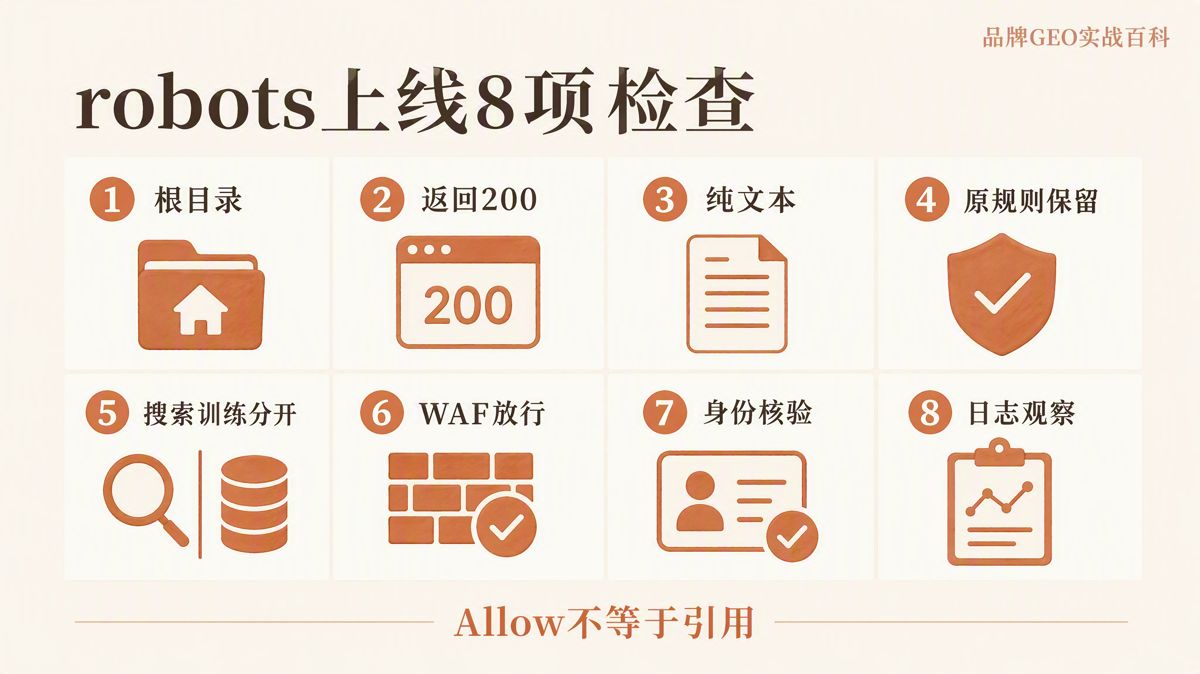
6. Eight Verification Checks to Complete After Deployment
Saving your robots.txt file only means the file was written to disk, not that the implementation works. Verify the following eight items after deployment:
| Check | Passing Standard |
|---|---|
| File Location | Accessible at /robots.txt across all subdomains |
| HTTP Status | Returns 200 (no redirects, login screens, or CAPTCHA challenges) |
| Content-Type | Returns plain text (text/plain) without encoding errors |
| Merged Rules | Existing restrictions for admin paths, query strings, and search pages remain intact |
| Search vs. Training | OAI-SearchBot is separated from GPTBot, and Claude-SearchBot from ClaudeBot |
| WAF / CDN | Legitimate bots are not blocked by 403, 429, or JavaScript verification screens (standard crawlers often fail JavaScript challenges) |
| Identity Verification | Crawler User-agent strings match official published IP ranges |
| Log Auditing | Ongoing review of crawl paths, status codes, and request frequency post-launch |
If bots are not crawling your site after the update, inspect your server logs first. Common culprits include WAF false positives, server timeouts, DNS misconfigurations, redirect chains, login requirements, or content hidden behind client-side JavaScript execution. The Domain Name System (DNS) translates human-readable domain names into network IP addresses.
Both OpenAI and Perplexity note that crawler updates may take time to reflect across their systems. Do not judge your configuration based on a single search query immediately after deployment.
7. Three Common Misconceptions
1. "I added Allow. Why isn't my site being cited?"
An Allow directive simply tells the crawler it is not forbidden from fetching the URL. It does not guarantee that the engine will crawl, index, display, or cite the page.
The page must be crawlable, load cleanly, and offer content relevant to the user's prompt. Permission to crawl and earning a citation are two different things.
2. "I added Disallow. Why do I still see requests in my logs?"
Check whether the request is from an official crawler and whether it was triggered directly by a live user action.
OpenAI notes that robots.txt directives may not apply to ChatGPT-User. Perplexity explicitly notes that Perplexity-User generally bypasses robots.txt.
If you must block specific access entirely, enforce it at the server level, through login barriers, or via WAF rules.
3. "Does blocking Google-Extended hurt Google Search rankings?"
No. According to Google's official documentation, blocking Google-Extended does not impact your inclusion or rankings in Google Search.
Google-Extended is managed separately from Googlebot, and it is not an independent user-agent requesting pages on the web.
8. What to Confirm Before You Finish
An effective robots.txt configuration answers three questions:
- What public content is open to traditional and AI search engines?
- What content should be kept out of AI model training datasets?
- What internal paths must remain restricted?
Review the official documentation for each User-agent, write your rules, back up and merge your existing file, and deploy. Once live, inspect your server access logs to confirm that crawlers behave as expected.
As AI platforms modify their crawlers and documentation, recheck your configuration periodically. A robots.txt file is not a set-and-forget asset, and it should never rely on unverified online lists.
FAQ
Where should the robots.txt file be hosted?
It must be placed in the root directory of each host:
https://www.example.com/robots.txt
Each subdomain requires its own independent configuration.
Can I allow AI search while blocking AI training?
Yes. Refer to the platforms' official crawler documentation and configure search indexers and training crawlers under separate User-agent blocks.
Can ChatGPT-User and Perplexity-User be controlled through robots.txt?
Not reliably. Both platforms document that user-prompted, live page fetches may or generally will bypass robots.txt rules.
Does robots.txt protect private data?
No. Sensitive assets, internal documents, and private user data must be secured using authentication, server access permissions, and WAF rules.
How do I verify that a crawler isn't spoofing its User-agent?
Compare the requesting IP address against the platform's officially published IP ranges or use reverse DNS lookup methods where supported.
Official Documentation
The English edition is rewritten from the original Chinese article on the same topic.

Starbox AI is an AI marketing company based in Hangzhou, China. This article draws on Starbox project work. Please credit the source when quoting.
Related reading
 GEO Guide
Why AI Marketing Vendor Quotes Vary 10x: A 4-Step Vetting Checklist
Evaluate AI marketing proposals by delivery actions, not slide decks. Audit source infrastructure, fact cleaning, and clean-environment testing.
Oct 22, 2026 · 6 min read
GEO Guide
Why AI Marketing Vendor Quotes Vary 10x: A 4-Step Vetting Checklist
Evaluate AI marketing proposals by delivery actions, not slide decks. Audit source infrastructure, fact cleaning, and clean-environment testing.
Oct 22, 2026 · 6 min read
 GEO Guide
Spotting GEO Scams: What Actually Drives AI Recommendations?
Automated AI ranking promises violate how LLMs work. Real AI recommendations rely on authoritative, structured facts across trusted public sources.
Oct 22, 2026 · 4 min read
GEO Guide
Spotting GEO Scams: What Actually Drives AI Recommendations?
Automated AI ranking promises violate how LLMs work. Real AI recommendations rely on authoritative, structured facts across trusted public sources.
Oct 22, 2026 · 4 min read
 GEO Guide
How to Measure Your Brand's AI Visibility with a Spreadsheet
You do not need expensive software to track AI recommendations. A three-tier prompt framework and a simple spreadsheet can score your brand visibility in half a day.
Oct 21, 2026 · 6 min read
GEO Guide
How to Measure Your Brand's AI Visibility with a Spreadsheet
You do not need expensive software to track AI recommendations. A three-tier prompt framework and a simple spreadsheet can score your brand visibility in half a day.
Oct 21, 2026 · 6 min read