
Organization Schema: How to Configure sameAs Correctly
The short answer
Organization Schema tells search engines who you are. Here is how to configure sameAs, avoid identity mismatches, and build reliable JSON-LD.
Organization Schema is structured code added to a webpage to help search engines understand essential facts about your business: your official name, website URL, brand logo, physical address, and verifiable identity profiles across the web.
Many websites implement this schema simply by copying a boilerplate template and swapping in their company name and domain. While the syntax looks valid, the underlying data often contains major flaws:
- The schema data contradicts visible text on the page.
- The
sameAsarray contains URLs that do not actually verify organizational identity. - Inconsistent names, logos, addresses, or profile links are scattered across different pages.
sameAs is a specific property within Organization Schema designed to link to external reference pages that unambiguously identify the exact same entity. These must be direct, crawlable URLs. A sameAs entry is not an exchange link, nor is it a place to dump every web page that mentions your brand.
Accurate Organization Schema helps search systems parse entity data, disambiguate identical brand names, and display brand logos in search features. However, it does not guarantee rich snippets, nor does it ensure that generative AI models will cite your website.
Structured data succeeds on truth, consistency, and ongoing maintenance—not on how many optional fields you stuff into the script.
6 Rules to Check Before Adding Schema
1. Place It on Pages That Actually Introduce the Organization
Google recommends placing Organization structured data on your homepage or a dedicated "About Us" page. You do not need to duplicate the full markup across every page on your site.
If your content management system (CMS) injects Organization markup site-wide by default, ensure that the entity name, logo, URL, and unique identifier (@id) remain completely identical on every URL.
2. You Do Not Need to Fill Every Field
Google's Organization guidelines do not require you to populate every available attribute. Only include accurate, relevant information that your team can keep up to date.
A lean script with three accurate properties is far better than a bloated script containing dead links or fabricated details. If you lack a public physical address, tax ID, headcount, or public phone number, leave those fields out. Never invent data just to make the schema appear complete.
3. Pick the Type That Matches Your Entity
The @type property defines the category of entity you are describing. A generic Organization type is not always the best choice.
An e-commerce site should evaluate OnlineStore, while a physical storefront should use LocalBusiness and adhere to its specific documentation. Choose the most specific type supported by Schema.org that reflects your actual business model.
4. Understand What sameAs Actually Means
Schema.org is a shared vocabulary used by webmasters and search engines to describe people, organizations, and products. It defines sameAs as the URL of a reference web page that unambiguously indicates the item's identity.
Do not use sameAs for partner links, topic hub pages, keyword-targeted landing pages, or press articles that merely reference your company in passing.
5. There Is No Minimum Count
You can include multiple URLs in sameAs, but search engines have no required minimum quota. There is no rule requiring five, eight, or ten links.
Include only profiles that you genuinely control or authoritative entries that establish your identity. Three accurate links are far more dependable than ten links containing third-party or ambiguous pages.
6. Prefer JSON-LD and Verify the Rendered Output
JSON-LD is a JavaScript-based data format embedded in a <script> tag. Google explicitly recommends JSON-LD because it is clean to implement, isolate, and debug.
Always validate the syntax before deploying. Once live, inspect the rendered HTML to verify that search engine crawlers receive the exact data output you configured in your backend.
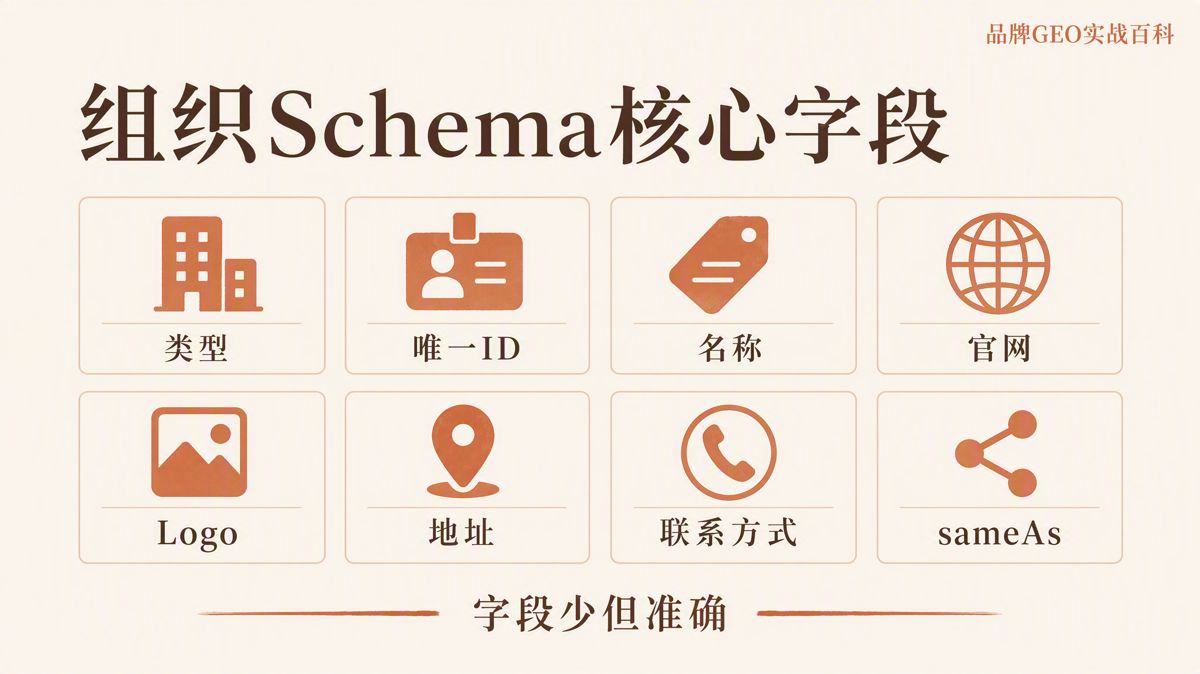
What to Put in Each Field
| Field | Purpose and Guidance | Common Mistakes |
|---|---|---|
@context |
Declares the schema vocabulary. Usually set to https://schema.org. |
Typographical errors or using HTTP instead of HTTPS. |
@type |
Specifies the entity category matching your core business. | Using generic Organization for brick-and-mortar stores or online shops. |
@id |
A stable, globally unique URI identifying the organization. | Generating a different @id on every subpage. |
name |
The standard display name recognized by users and searchers. | Inconsistent brand names across site code, headers, and social accounts. |
legalName |
The formal corporate name matching registered business filings. | Inserting slogans or marketing taglines into the legal name. |
alternateName |
Recognized acronyms, secondary English names, or legacy brands. | Stuffing keywords and product lists into aliases. |
url |
The canonical homepage URL of the official website. | Linking to temporary landing pages, tracking links, or campaign URLs. |
logo |
The direct URL to an accessible, high-resolution brand logo image. | Image URLs that return 404s, require authentication, or are too small. |
description |
A concise corporate summary supported by visible page copy. | Adding exaggerated claims, awards, or capabilities not found on the page. |
foundingDate |
The verified year or date the business was established. | Unverified or inconsistent dates across the site. |
address |
The real, operational business location. | Address details that conflict with registration records or footer text. |
contactPoint |
Active customer-facing communication channels. | Listing defunct email addresses or disconnected phone numbers. |
sameAs |
Authoritative external URLs verifying corporate identity. | Adding search result pages, syndicated press releases, or partner sites. |
How to Distinguish name, legalName, and alternateName
Do not treat these three fields as independent marketing copy fields:
name: The everyday trading name recognized by your audience.legalName: The formal legal entity name on official corporate registration documents.alternateName: Recognized abbreviations, English trading names, or established historical names.
Populating both name and legalName makes sense primarily when your public brand name differs from your incorporated corporate name.
Before publishing, map your naming consistency:
| Property | Example Value | Verification Source |
|---|---|---|
name |
Example Tech | Site header, primary logo mark, standard site title |
legalName |
Example Technology Co., Ltd. | Business registration, terms of service, privacy policy |
alternateName |
ExTech | Widely used acronym found on official materials |
If an alternate name never appears in public documents or visible web copy, do not invent it for schema markup.
Why @id Must Remain Stable
The @id property provides an unambiguous, permanent machine identifier for an entity within your structured data graph. It does not need to lead to an independent web page when visited in a browser.
A standard practice is appending an anchor fragment to your canonical domain:
"@id": "https://www.example.com/#organization"
When nested schema objects like Article, WebSite, or Product reference your business as a publisher, author, or manufacturer, reference this exact @id URI. This connects your entire site into a coherent knowledge graph without redefining names, logos, and addresses in every block.
Parent companies, independent subsidiaries, and physical branches should each maintain distinct @id identifiers if they represent separate legal or operational entities.
Which Links Belong in sameAs
Deciding whether a URL belongs in sameAs has nothing to do with how famous the platform is. The only criterion is whether the destination page unmistakably identifies your organization.
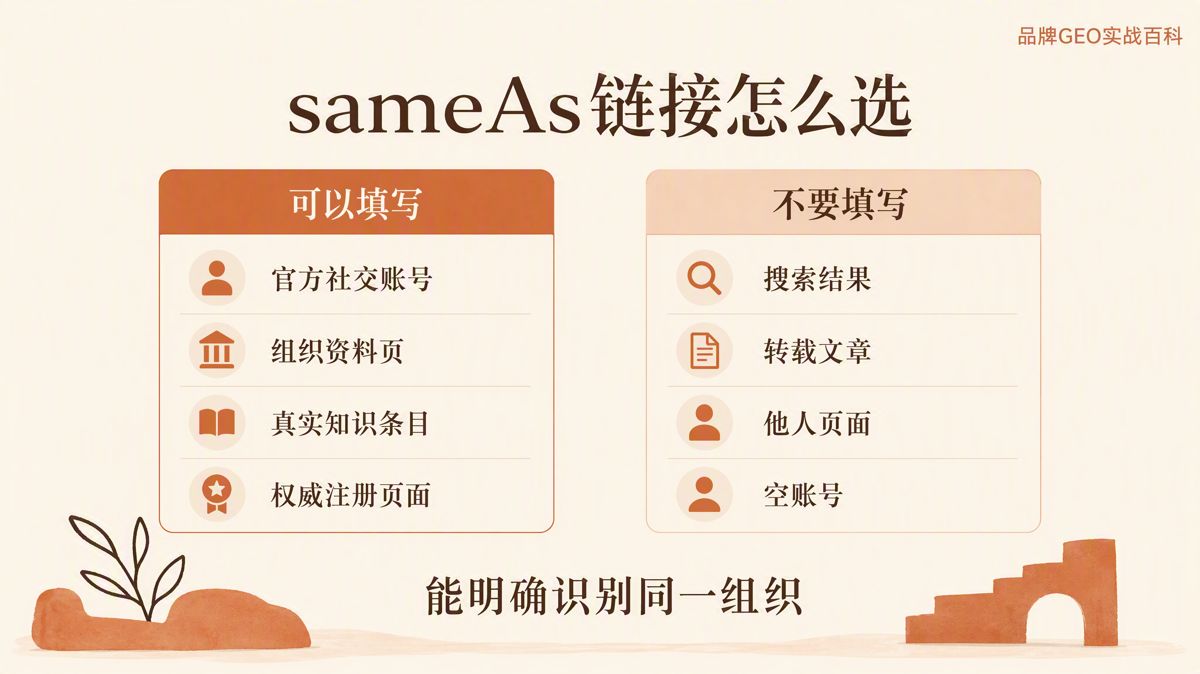
Recommended URLs for sameAs:
- Official corporate social media channels managed directly by the organization.
- Dedicated brand profiles on verified third-party business directories and review portals.
- Established Wikipedia or Wikidata entity pages that meet community guidelines.
- Official listings within government registries or recognized international business identity databases.
Wikipedia is an open, community-curated encyclopedia, while Wikidata serves as an open, structured knowledge base for entities.
Never include these in sameAs:
- Internal site search results, tag archives, or topic hubs.
- Media coverage, PR announcements, or blog posts that merely mention your brand.
- Personal profiles of founders, board members, distributors, or partner companies.
- Broken links, unverified placeholder URLs, or redirects to unrelated domains.
- Dormant social accounts created solely to pad out schema properties.
If your company does not have a Wikipedia article or a Wikidata entry, omit them entirely. Never retain placeholder Wikidata QIDs from online tutorials, and never borrow another entity's identifier. A QID is the unique alphanumeric ID Wikidata assigns to each item.
Handling Logos, Addresses, and Contact Details
Google requires organization logo images to be at least 112×112 pixels, crawlable by search engine bots, and hosted in standard image formats. If you use a white or transparent SVG/PNG logo, verify that it renders legibly on light backgrounds.
In JSON-LD, wrap the logo URL inside an ImageObject type.
Addresses should use the PostalAddress type, splitting data into streetAddress, addressLocality, addressRegion, postalCode, and addressCountry (preferably using two-letter ISO country codes, such as US, GB, or CN).
Contact information should use ContactPoint. Include full international dialing prefixes for phone numbers, and use contactType to define the department, such as "customer service" or "technical support."
Only publish customer channels that are actively monitored. Do not expose private corporate numbers or direct employee extensions in structured markup, as all code inside JSON-LD is publicly visible in your page source.
A Customizable JSON-LD Template
Below is a baseline template using placeholder values. It is designed to be embedded in your page's HTML <head> or body.
Review each field, replace placeholder values with verified business information, and delete every property that does not apply to your business before deploying.
<script type="application/ld+json">
{
  "@context": "https://schema.org",
  "@type": "Organization",
  "@id": "https://www.example.com/#organization",
  "name": "Example Technology Co., Ltd.",
  "legalName": "Example Technology Co., Ltd.",
  "alternateName": "Example Tech",
  "url": "https://www.example.com/",
  "logo": {
    "@type": "ImageObject",
    "url": "https://www.example.com/assets/logo.png"
  },
  "description": "Design, manufacturing, and technical support services for industrial automation systems.",
  "foundingDate": "2018-06-01",
  "address": {
    "@type": "PostalAddress",
    "streetAddress": "88 Example Road",
    "addressLocality": "Hangzhou",
    "addressRegion": "Zhejiang",
    "postalCode": "310000",
    "addressCountry": "CN"
  },
  "contactPoint": {
    "@type": "ContactPoint",
    "telephone": "+86-571-0000-0000",
    "email": "contact@example.com",
    "contactType": "customer service"
  },
  "sameAs": [
    "https://www.linkedin.com/company/example-company",
    "https://www.youtube.com/@example-company",
    "https://www.wikidata.org/wiki/Q000000"
  ]
}
</script>
This snippet is a starting reference. If a field lacks accurate information, delete the entire line rather than leaving empty quotes or placeholder values.
Where to Place Organization Schema
Place your Organization Schema on your homepage or primary "About Us" page. A single, authoritative declaration on your core profile page is sufficient for most websites.
If your CMS or active theme automatically injects Organization Schema across every page, verify that every instance shares the exact same @id, entity details, and canonical URL.
Duplicate output across pages does not inherently trigger penalties, but conflicting data generated by multiple SEO plugins, themes, and widgets creates entity confusion and technical maintenance debt.
Never restrict Organization Schema to pages protected by authentication walls, gated behind noindex tags, or blocked by directives in robots.txt. A noindex directive prevents search engines from indexing a URL, while robots.txt instructs web crawlers which paths they may not access.
Once deployed, use Google Search Console's URL Inspection tool to confirm that Google's crawler parses the JSON-LD payload from the rendered HTML.
8 Checks to Complete Before Going Live
Validate your code using Google's Rich Results Test before publishing. Once live, confirm crawler visibility via the URL Inspection tool in Google Search Console.
Review this checklist before deployment:
- The JSON-LD syntax is valid, with correct brackets, quotes, and commas.
@contextpoints tohttps://schema.organd@typereflects your actual business.- Brand name, domain URL, logo, and address match visible website content.
- The logo URL is live, publicly crawlable, and properly sized.
- Every link in
sameAsrepresents your organization and resolves without errors. - All placeholder copy, empty strings, and broken links are fully removed.
- Google's Rich Results Test reports zero critical syntax errors.
- Search Console's URL Inspection tool sees the updated markup in live rendered HTML.
Passing structured data validation does not guarantee search engine knowledge panels or rich snippets. Structured data supplies machine-readable facts; it is not an automatic switch for visual search enhancements.
How to Maintain It After Launch
Whenever your company rebrands, moves offices, updates domain names, changes customer service numbers, or migrates social profiles, update your structured data alongside your visible web copy.
Remove dead social profiles or closed accounts from sameAs immediately. Maintain an internal changelog of your schema modifications, and re-test URLs whenever core data updates.
If your markup is handled by a CMS plugin, re-verify your rendered output after major plugin or theme updates to confirm:
- Custom properties were not wiped or reverted to plugin defaults.
- No redundant, duplicate Organization objects were introduced into your templates.
Always evaluate the final HTML source served to users and crawlers, not just the settings form inside your CMS dashboard.
Frequently Asked Questions
1. Does Organization Schema have to go on every page?
No. Google recommends placing it on your homepage or an authoritative "About Us" page. If your site architecture generates it across all pages automatically, ensure the entity details and @id remain strictly identical throughout.
2. Must I include at least 8 links in sameAs?
No. There is no official minimum threshold. Only add links that verifiably correspond to your organization. Data accuracy matters far more than URL count.
3. What if our company has no Wikipedia or Wikidata entry?
Leave those properties out. Never copy example Wikidata QIDs from public documentation, and do not create low-quality Wikipedia articles simply to populate structured data properties.
4. Will adding Organization Schema guarantee citations by AI engines?
No. It provides explicit signals that help algorithms disambiguate entities and associate brand assets like logos. Whether an AI system cites your content depends on broader crawlability, indexation, content authority, and user intent.
5. Do I need to audit schema output if a plugin generates it?
Yes. Plugins frequently inject placeholder social links, outdated default company names, or fallbacks that conflict with active theme markup. Always verify the live rendered page source.
6. How do I confirm my deployment was successful?
Test code snippets with Google's Rich Results Test prior to launch. After pushing changes live, run the page URL through Google Search Console's URL Inspection tool to verify that the live crawler reads your structured data without warnings.
Official References
The English edition is rewritten from the original Chinese article on the same topic.

Starbox AI is an AI marketing company based in Hangzhou, China. This article draws on Starbox project work. Please credit the source when quoting.
Related reading
 GEO Guide
Why AI Marketing Vendor Quotes Vary 10x: A 4-Step Vetting Checklist
Evaluate AI marketing proposals by delivery actions, not slide decks. Audit source infrastructure, fact cleaning, and clean-environment testing.
Oct 22, 2026 · 6 min read
GEO Guide
Why AI Marketing Vendor Quotes Vary 10x: A 4-Step Vetting Checklist
Evaluate AI marketing proposals by delivery actions, not slide decks. Audit source infrastructure, fact cleaning, and clean-environment testing.
Oct 22, 2026 · 6 min read
 GEO Guide
Spotting GEO Scams: What Actually Drives AI Recommendations?
Automated AI ranking promises violate how LLMs work. Real AI recommendations rely on authoritative, structured facts across trusted public sources.
Oct 22, 2026 · 4 min read
GEO Guide
Spotting GEO Scams: What Actually Drives AI Recommendations?
Automated AI ranking promises violate how LLMs work. Real AI recommendations rely on authoritative, structured facts across trusted public sources.
Oct 22, 2026 · 4 min read
 GEO Guide
How to Measure Your Brand's AI Visibility with a Spreadsheet
You do not need expensive software to track AI recommendations. A three-tier prompt framework and a simple spreadsheet can score your brand visibility in half a day.
Oct 21, 2026 · 6 min read
GEO Guide
How to Measure Your Brand's AI Visibility with a Spreadsheet
You do not need expensive software to track AI recommendations. A three-tier prompt framework and a simple spreadsheet can score your brand visibility in half a day.
Oct 21, 2026 · 6 min read