
GEO Pre-Publish Checklist: 8 Items to Verify Before Going Live

The short answer
Review your GEO content across eight critical dimensions before publishing to ensure clear structure, factual backing, and cross-element consistency.
Generative Engine Optimization (GEO) focuses on optimizing content for generative AI search environments—platforms where an AI processes user prompts, synthesizes relevant data, and generates a unified response. GEO content refers to web pages written and published specifically to perform well in these scenarios.
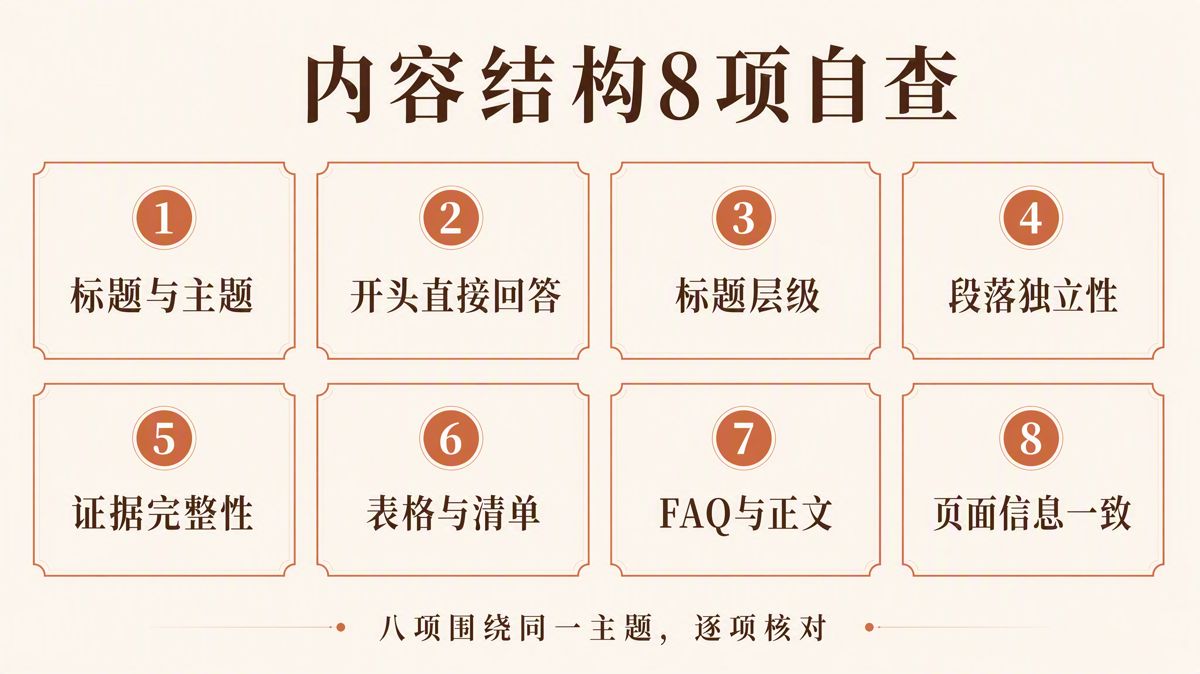
Before publishing any piece of GEO content, verify it against eight criteria: 1. Is the title precise? 2. Does the opening answer the core question immediately? 3. Is the heading hierarchy clear? 4. Can each paragraph stand on its own? 5. Are key assertions backed by verifiable evidence? 6. Do tables, lists, and images provide net-new information? 7. Is the FAQ section consistent with the main text? 8. Are all on-page elements aligned on the same version?
This checklist focuses strictly on what publishers can control. Passing these checks does not guarantee that search engines will crawl, index, cite, or recommend your page. What it does solve are pre-publish quality issues: helping readers grasp information quickly, enabling search algorithms to identify your topic accurately, and eliminating conflicts among your title, body text, visual assets, FAQs, and page code.
Google's public search documentation establishes clear fundamentals: content should provide genuine value, headings and paragraphs should facilitate scanning, and search crawlers must be able to parse the page cleanly. Structured data—code annotations formatted to explain page content—must accurately reflect what users see on screen. There is no need to chop articles into disjointed fragments for AI models, nor should you invent an artificial "AI-only" writing style.
Use this summary table for a rapid pre-launch audit:
| Check Item | Passing State | Issue to Fix |
|---|---|---|
| 1. Title & Subject | Readers immediately know what problem the page solves | The title promises topic A, but the body primarily discusses topic B |
| 2. Direct Opening | States the conclusion, target audience, and scope upfront | Multiple introductory paragraphs pass without giving a concrete answer |
| 3. Heading Hierarchy | Clear division of responsibilities across H1, H2, and H3 | Using raw font sizes instead of heading tags, or skipping heading levels |
| 4. Paragraph Autonomy | Each paragraph has a distinct subject, assertion, and takeaway | Heavy reliance on ambiguous pronouns that fail outside the immediate context |
| 5. Evidence Integrity | Data points include source, date, methodology, and limitations | Naked statistics with no source attribution or qualification |
| 6. Tables, Lists & Images | Every format delivers practical, non-redundant information | Repeating narrative text verbatim inside a table just to add visual elements |
| 7. FAQ Alignment | Resolves authentic follow-up questions without introducing unsourced claims | Repeating main headings as questions, or contradicting the body text |
| 8. Cross-Page Versioning | Title, meta description, body, and schema markup match | Code markup contains claims or sections absent from the rendered page |
1. Does the Title Accurately Scope the Question?
Review the target entity, core problem, and operational scope defined in your title. A reader looking only at the title should instantly know what the page covers, what problem it solves, and where its boundaries lie.
If your title says "How to Choose," the body must provide concrete evaluation criteria. If it says "Self-Audit Checklist," the article must enable readers to assess their work item by item. If it specifies "2026 Edition," all policies, products, and metrics cited must align with that timeframe.
Avoid packing multiple distinct objectives into a single title. A headline like "How to Write, Distribute, and Measure GEO Content" spans three separate operational phases. If your article focuses solely on structural formatting, narrow the title to content structure instead of overpromising on topics the body does not cover.
Once your subject is locked in, cross-check three distinct placements:
- The browser Title tag in the page code
- The H1 heading at the top of the body text
- The social sharing title generated in preview cards
These do not need to be identical word for word, but the core entity, primary problem, and fundamental takeaway must not diverge.
Google's guidance on title links recommends keeping titles concise and descriptive while avoiding ambiguity and keyword stuffing. You can review the details in Google's title link documentation.
2. Does the Opening Answer the Question Immediately?
Your opening does not need an overview of macro trends, industry evolution, or technological breakthroughs. A far more effective approach is to answer the title's core question in two to three sentences, outline who the advice applies to and where it stops, and specify what the rest of the page will deliver.
Run through four checkpoints when auditing your intro:
- What specific problem does this page solve?
- What is the central conclusion or verdict?
- Who is this conclusion valid for, and what are its constraints?
- What specific checklists, steps, or evidence follow below?
A reader should be able to walk away with your primary takeaway without reading further. The rest of the article exists to provide supporting rationale, execution details, and boundary cases.
A practical test: delete the first two paragraphs. Does the article lose any necessary facts? If not, those paragraphs were mere filler and should be trimmed or cut entirely.
A shorter opening is not automatically better. The benchmark is whether the reader can jump directly into resolving their specific challenge.

3. Do H1, H2, and H3 Serve Distinct Roles?
Heading tags (H1, H2, and H3) define structural relationships between concepts. They are not styling tools for adjusting font sizes.
A page should contain only one H1 summarizing the overarching theme. H2 tags divide the piece into core sub-topics. H3 tags break down specific secondary questions directly beneath a given H2.
Never skip levels (such as jumping from H1 directly to H3), and avoid styling standard body text as a heading purely to enlarge the font.
When reviewing each H2, ask: Does this heading help the reader isolate a standalone problem?
Labels like "Why This Matters," "Implementation Steps," "Verification Criteria," and "When to Pause" provide far more utility than generic markers like "Background," "Overview," or "More Information." Generic headings tell the reader nothing about the underlying answers.
If two adjacent H2 sections handle the same fundamental problem, merge them. If an H2 covers multiple distinct challenges, split it. After this pass, a reader scanning only the table of contents should clearly understand the article's logical progression.
Google's documentation on AI search optimization highlights the value of distinct paragraphs, sections, and headings to facilitate information retrieval, emphasizing that content must be created primarily for human readers rather than formatted artificially for bots. For further detail, review Google's guide on AI search optimization.
4. Can Each Paragraph Stand on Its Own?
Paragraph completeness does not mean breaking copy into fragmented single-sentence lines. A self-contained paragraph clearly identifies the subject, the primary assertion, the supporting rationale, and the conclusion.
A reliable structure is to state the primary point in the opening sentence, followed by supporting explanations, data, or operational parameters. Move to a new paragraph when the topic or specific question shifts.
Prior to publishing, audit four common phrasing issues:
- Check whether pronouns like "it," "this," "the above," or "these" clearly refer to a single, unambiguous subject.
- Confirm that causal connectors ("therefore," "consequently," "leads to") denote a verified causal relationship rather than mere correlation.
- Verify that every data point includes its unit of measurement, timeframe, and comparison baseline.
- Ensure conclusions retain necessary conditions and nuance (e.g., "may," "under certain configurations," "in specific markets").
If a sentence becomes unreadable outside the context of the preceding paragraph because of an ambiguous pronoun, name the subject directly. If your evidence only demonstrates that two events occurred simultaneously, do not assert that one caused the other.
Google's documentation notes that there is no universal word count requirement, nor any technical need to slice copy into micro-segments for generative search. Evaluate your paragraphs by whether a reader can understand them accurately.
5. Do Key Claims Have Verifiable Evidence?
Content structure is more than visual layout. Where you place your evidence—and which specific assertion it connects to—determines whether a reader or search engine can validate your findings.
Whenever you cite data, legal regulations, software capabilities, case metrics, or comparative benchmarks, place the source and its operating conditions adjacent to the claim. Do not dump a generic list of citations at the bottom of the article and expect readers to guess which source supports which sentence.
Audit your citations against these five criteria:
| Field | Core Requirement |
|---|---|
| Claim | Which specific statement does this evidence support? |
| Source | Who published it, and does the original link resolve properly? |
| Date | When was this information published or last updated? |
| Scope | What were the sample size, region, platform, and methodology? |
| Limits | Does this data apply directly to the current scenario? |
When referencing secondary commentary, trace the claim back to the primary source, such as the original policy document, technical manual, white paper, or raw dataset. If the primary source cannot be verified, temper the certainty of your conclusion accordingly.
Phrases like "studies show" or "industry consensus indicates" do not count as proper citations. Readers need to know the specific study, who conducted it, when it was released, and the exact scope of its findings.
6. Do Tables, Lists, and Images Add Meaningful Information?
Choose your format based on the structure of the data: - Tables are best for comparing items across uniform dimensions. - Lists work best for procedural sequences or audit criteria. - Diagrams are ideal for showing workflows and chronological dependencies.
If your text already explains a point clearly, re-packaging that exact language inside a table adds clutter rather than clarity. Verify the following before pushing live:
- Do all columns in a table operate on the same comparative level?
- Are metrics, units, and baseline dates uniform throughout?
- Does an empty cell indicate "zero," "not applicable," or "unverified"?
- Can every checklist item be objectively evaluated and executed?
- Does every image directly support the adjacent text?
- Do image filenames and alt attributes accurately describe the visual content?
The alt attribute provides alternative text for an image when it fails to load or when a user relies on a screen reader.
Ensure checklist entries are actionable. Write "Does the title define the entity and core question?" rather than a subjective phrase like "Is the title compelling?" Similarly, avoid generic alt tags like image-1.jpg; specify what the image actually depicts.
If an image contains critical data or key textual conclusions, replicate those facts in the surrounding body text. Otherwise, whether readers and search crawlers capture those facts depends entirely on automated image extraction.
7. Does the FAQ Address Genuine Questions?
An FAQ (Frequently Asked Questions) section should address genuine boundary conditions, exceptions, and follow-up details that arise from the main text. It should never merely rephrase your H2 headings into questions to repeat body copy.
Evaluate every prospective FAQ against three questions:
- Is this a realistic follow-up question a target reader would ask?
- Does the answer align strictly with the assertions in the main text?
- If this entry were deleted, would a critical caveat or boundary condition be lost?
An FAQ item is only worth including if it satisfies all three conditions.
When drafting FAQ answers, lead with a direct answer before elaborating on constraints. Do not introduce new metrics, unbacked assertions, or product promises that appear nowhere else in the body. The number of questions should reflect the complexity of the topic; do not pad the section to hit an arbitrary count.
If you implement FAQPage schema—structured markup designed for Q&A content—ensure the questions and answers in your JSON-LD code match the visible text on the page verbatim.
Google's structured data guidelines mandate that code markup must represent visible on-page content accurately. It must not reference hidden text, irrelevant concepts, or misleading claims. Proper schema implementation does not guarantee rich snippets or enhanced search engine displays. You can review the policy details in Google's structured data policies.
8. Is the Entire Page on the Same Version?
The final check ensures your page is free from internal versioning conflicts. Discrepancies often emerge when an article's body is revised while surrounding metadata retains legacy copy.
Common failure points include: - The body text is updated, but the meta description retains an outdated conclusion. - The on-page H1 is revised, but Open Graph and Twitter card tags display the old headline. - An FAQ question is cut from the visible page, but remains inside the JSON-LD schema block. - Updated metrics are added to the body text, while adjacent charts or tables display older figures.
Run a coordinated audit across these elements:
- Browser Title vs. on-page H1
- Opening summary vs. main body conclusions
- Numbers across text, tables, and visual assets
- Rendered FAQ copy vs. structured schema code
- Author profile, original publish date, and last modified timestamp
- Current page copy vs. social sharing preview assets
Whenever you spot an inconsistency, update the peripheral elements to align with the verified facts in your visible body text. Never leave outdated content inside your structured data markup simply to pass a schema validator.
How to Determine If Content Is Ready to Publish
Once you have completed the eight steps, categorize your page into one of three operational states:
| Review Outcome | Publishing Action |
|---|---|
| Fail | Title contradicts the body, core claims lack sources, data points conflict, or schema markup contains hidden content: Halt publication. |
| Needs Revision | Broken heading hierarchy, redundant paragraphs, mismatched table dimensions, or an FAQ that adds no distinct value: Revise and re-audit. |
| Pass | Topic is unified, the opening provides a direct answer, the hierarchy is clean, evidence is traceable, and all page elements align: Ready to publish. |
This framework does not guarantee that search engines will instantly index, cite, or surface your page. Its purpose is to eliminate identifiable editorial vulnerabilities: aligning your messaging, anchoring your claims to credible sources, improving readability, and removing technical contradictions between your visible content and underlying code.
FAQ
1. Should GEO content always use shorter paragraphs?
No. Paragraph length should reflect the complexity of the subject. The critical requirement is that each paragraph has a clear subject and complete meaning, allowing readers to follow along easily. Google's documentation explicitly notes that you do not need to fragment text into tiny snippets for generative AI.
2. Does every piece of content require a table?
No. Tables are only valuable when you need to compare items across uniform dimensions. When there is no comparative relationship, step-by-step instructions, checklists, or standard paragraphs are often clearer.
3. Must the H1 and the browser Title match word for word?
No. They do not need to be identical, but they must address the exact same topic. The H1 generally summarizes the on-page content, while the browser Title is tailored for search result displays. You can adjust the phrasing as needed, provided the target subject, core question, and conclusion remain the same.
4. Will adding more FAQ items make AI engines more likely to cite your page?
Not necessarily. An FAQ section should answer genuine reader questions and remain consistent with the main body. Padding an FAQ with redundant questions or unsubstantiated claims does not improve content quality.
5. Does passing a structured data test mean your content structure is fully optimized?
No. A test tool only validates the technical syntax of your schema markup. Whether the body content delivers genuine value, whether the schema accurately mirrors visible text, and whether search crawlers can properly interpret the page must each be evaluated separately. Valid schema does not guarantee rich results in search engines.
6. Do you need to recheck content after it has already been published?
Yes. Updates to the body text, regulatory shifts, product changes, or page template redesigns can cause titles, images, tables, FAQs, and structured data to fall out of sync. Any substantive update warrants a fresh pass through this checklist.
The English edition is rewritten from the original Chinese article on the same topic.

Starbox AI is an AI marketing company based in Hangzhou, China. This article draws on Starbox project work. Please credit the source when quoting.
Related reading
 GEO Guide
Why AI Marketing Vendor Quotes Vary 10x: A 4-Step Vetting Checklist
Evaluate AI marketing proposals by delivery actions, not slide decks. Audit source infrastructure, fact cleaning, and clean-environment testing.
Oct 22, 2026 · 6 min read
GEO Guide
Why AI Marketing Vendor Quotes Vary 10x: A 4-Step Vetting Checklist
Evaluate AI marketing proposals by delivery actions, not slide decks. Audit source infrastructure, fact cleaning, and clean-environment testing.
Oct 22, 2026 · 6 min read
 GEO Guide
Spotting GEO Scams: What Actually Drives AI Recommendations?
Automated AI ranking promises violate how LLMs work. Real AI recommendations rely on authoritative, structured facts across trusted public sources.
Oct 22, 2026 · 4 min read
GEO Guide
Spotting GEO Scams: What Actually Drives AI Recommendations?
Automated AI ranking promises violate how LLMs work. Real AI recommendations rely on authoritative, structured facts across trusted public sources.
Oct 22, 2026 · 4 min read
 GEO Guide
How to Measure Your Brand's AI Visibility with a Spreadsheet
You do not need expensive software to track AI recommendations. A three-tier prompt framework and a simple spreadsheet can score your brand visibility in half a day.
Oct 21, 2026 · 6 min read
GEO Guide
How to Measure Your Brand's AI Visibility with a Spreadsheet
You do not need expensive software to track AI recommendations. A three-tier prompt framework and a simple spreadsheet can score your brand visibility in half a day.
Oct 21, 2026 · 6 min read