
Verifying Schema Markup and robots.txt Before Launch
The short answer
A clean validation check does not mean your page is ready to deploy. Here is how to verify Schema facts, robots.txt rules, and crawl directives.
Your Schema markup passes validation, and robots.txt returns zero syntax errors. Can you push the update live?
Not yet.
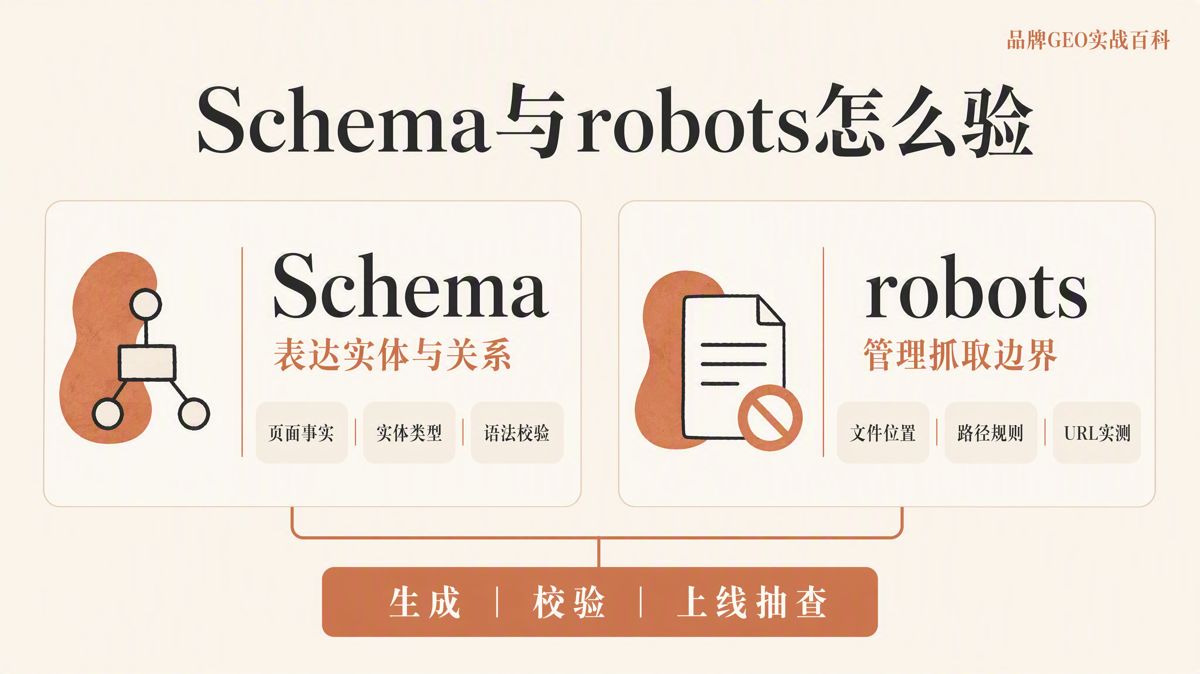
Schema markup relies on the Schema.org vocabulary to describe entities—such as people, organizations, and products—along with their attributes and relationships. A robots.txt file sits in your root directory as a public plain-text document, telling search crawlers which paths they are permitted to request.
These two mechanisms solve fundamentally different problems: Schema helps search engines understand what a page means, while robots.txt controls where crawlers are allowed to go. Passing a syntax validator on both files does not prove that your markup matches actual on-page content, nor does it guarantee that the page will earn a rich result or be cited in an AI-generated answer.
A rich result is an enhanced display format in search engine results pages (SERPs). A generative answer is a synthesized response generated by an AI or search system using retrieved web sources.
Pre-launch verification is not about collecting green checkmarks in automated testing tools. It requires confirming that every piece of data in your code is supported by verifiable evidence on the page.
Why a Single "One-Click" Tool Cannot Complete Verification
Schema needs to answer three core questions: 1. What is the primary subject of the page? 2. What attributes define that entity? 3. How are different entities on the page related to one another?
A robots.txt file must answer a different set of questions: 1. Which search crawlers (User-agents) are you addressing? 2. Which paths are crawlers allowed to access? 3. Which paths are explicitly blocked?
Relying on a single automated tool to audit both areas usually leads to two problems: - Structured data is generated cleanly, but the fields conflict with the live copy on the page. - The robots.txt syntax is valid, but the rules accidentally block article pages, scripts, stylesheets, or images required to render the content.
Before deploying updates to production, you need five specific artifacts: - The structured data code snippet. - A Schema syntax validation report. - A feature-eligibility test report from the target search engine. - The production robots.txt file. - A test log evaluating actual URLs against your allow and disallow rules.
Each asset serves a distinct purpose. A passing grade on one never substitutes for an audit of the others.
Step 1: Confirm On-Page Facts Before Choosing Schema Types
Do not open a Schema generator and start guessing what values to fill in. Start by reviewing the live page and compiling the facts visible to human users:
- Entity name
- Page title
- Author
- Publication date and last modified timestamp
- Product or service specifications
- Physical address and contact details
- FAQ questions and answers
If a piece of information is not visible to users on the page, it does not belong in your structured data markup.
Once your list of visible facts is clear, select the appropriate Schema type based on the primary purpose of the page:
- Corporate homepages should focus on the Organization entity.
- Blog posts and guides should focus on Article, the author, and date fields.
- Local storefronts must verify physical addresses and operating hours.
- Product pages must reflect live pricing, availability, and product identifiers.
A single URL can describe multiple entities—such as an organization publishing an article about a product. However, your code must explicitly define the relationships between those entities using properties like publisher or author. Do not add arbitrary types simply to inflate your markup footprint, and never group unrelated entities together.
Structured data typically appears in one of three formats: - JSON-LD: A standalone script block embedded in the page header or body. - Microdata: HTML tags annotated with custom attributes. - RDFa: HTML5 extensions that declare structured metadata.
When your technical environment allows it, Google Search Central recommends using JSON-LD. It decouples structured data from HTML presentation, making maintenance simpler and reducing the risk of markup errors caused by page redesigns.
Using JSON-LD does not give you an automatic ranking advantage. What matters is your team's ability to keep the markup aligned with live page content over the long term.
Any Schema generation tool used in production must support: - Fixed, reusable templates. - Strict field validation. - Separation between staging and production environments. - Version history tracking.
Tools that require manual copy-pasting for individual pages may work for small experiments, but they are unreliable for enterprise-scale deployments.
Step 2: Test Syntax, Entity Relationships, and Page Facts Separately
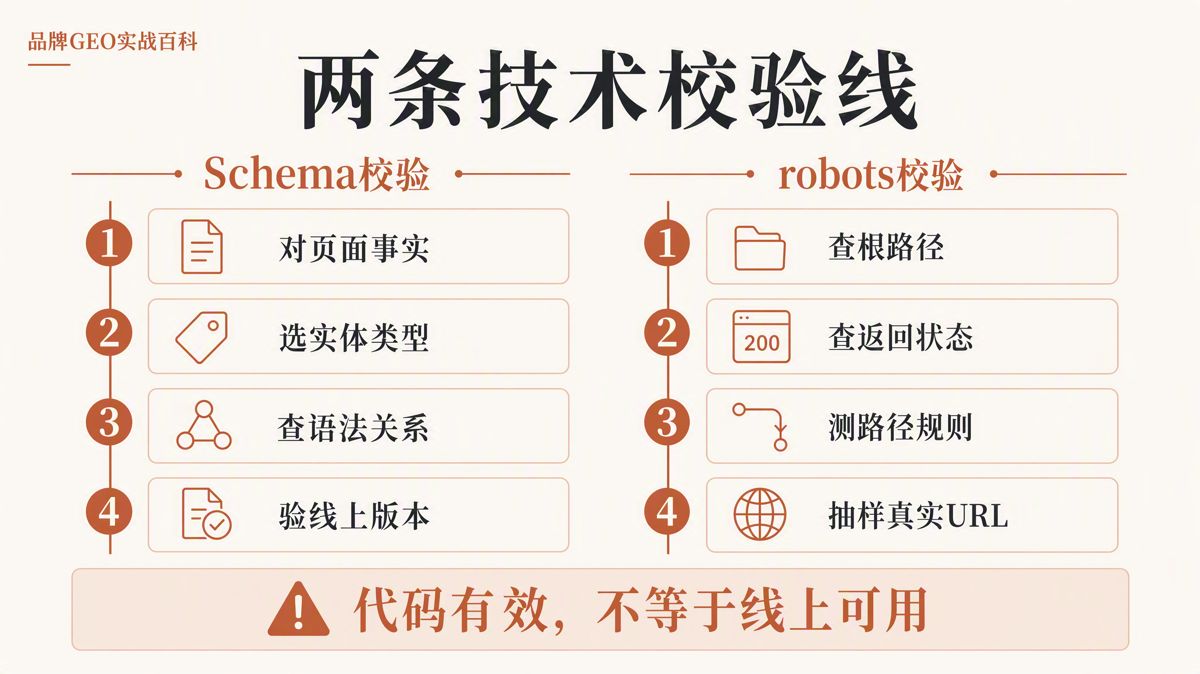
Run your first inspection through the official Schema.org Markup Validator. It processes JSON-LD, Microdata, and RDFa to verify structural fundamentals:
- JSON code blocks are properly formatted and closed.
- Declared properties exist within the official Schema.org vocabulary.
- Field data types match expectations (e.g., ISO dates, numeric prices).
- Entities are not duplicated unnecessarily.
- The @id URI consistently identifies the same entity across the site.
This validator tests the markup against Schema.org standards. A clean test does not confirm whether a search engine will support the markup for enhanced search displays.
The second round requires a manual check against the rendered page. Review entity names, author bylines, dates, pricing, product images, and URLs side by side.
If your code contains hidden text, expired prices, fabricated reviews, or incorrect authors, it fails inspection—regardless of how clean the syntax is.
Because JSON-LD can be maintained independently from your visual templates, it is easy to update, but it is equally easy for the code to fall out of sync with the front end. Connect your Schema generation directly to your CMS database fields or store it in version-controlled repositories rather than relying on manually pasted static snippets.
Step 3: Verify Support for Target Search Features
The Schema.org vocabulary includes hundreds of types, but search engines only support a fraction of them for enhanced SERP features.
After validating raw syntax, evaluate your pages against your target search engine's technical documentation to verify required fields, recommended fields, and content policies.
For Google, this involves two specific utilities: - Rich Results Test: Evaluates whether your structured data meets the prerequisites for supported search enhancements. - URL Inspection Tool: Shows how Googlebot actually fetches, renders, and reads the code on the live URL. Rendering is the process where a search engine executes JavaScript and CSS to view the final layout.
These two checks serve different functions. The Rich Results Test checks if the code structure qualifies for specific features. The URL Inspection Tool verifies what Google's crawler actually retrieved from the live environment.
During review, separate these four outcomes: 1. The Schema syntax is valid. 2. The page meets the requirements for a rich result. 3. The page actually displays a rich result in live SERPs. 4. The page is cited as a source in an AI generative answer.
These outcomes are entirely separate. While structured data helps machines parse relationships, official documentation makes no guarantee that adding markup will grant higher rankings, guaranteed rich snippets, or citations in AI overviews. Promising that valid code will automatically yield SERP enhancements is an audit error.
Step 4: Check robots.txt Location and HTTP Response Status
The Robots Exclusion Protocol is governed by RFC 9309. A standard file consists of records grouping User-agent directives with Allow and Disallow rules. It manages crawler requests, but it is not a tool for managing user permissions.
Begin by requesting /robots.txt directly from the root path of every production domain and recording the following data:
- The final destination URL.
- The HTTP status code returned.
- The declared Content-Type header (it should be text/plain).
- Any redirect hops encountered.
A robots.txt file applies strictly to its matching protocol, hostname, and port.
For example, https://www.example.com/robots.txt does not govern requests made to http://example.com/, nor does it apply to subdomains such as https://blog.example.com/. If your architecture splits traffic across root domains, www subdomains, mobile subdomains, or dedicated media CDNs, each endpoint must have its own verified configuration.
Under standard conditions, the file should return a clean 200 OK status. If the file is missing, crawlers will typically assume all public paths are accessible. However, if your server returns persistent 5xx server errors, request timeouts, or redirect loops, crawlers may suspend crawling to avoid overloading an unstable server.
Your audit must clearly distinguish between two conditions: - The file does not exist (HTTP 404). - The file is temporarily unreachable (HTTP 5xx or network timeout).
These issues require different remediation workflows. Do not bundle them under a generic "robots.txt error."
Finally, remember that robots.txt files are publicly readable. Disallowing a path does not hide it. Never rely on a Disallow rule to secure administrative portals, internal staging paths, or customer records. Private assets must be protected behind authentication, access control lists, or network-level restrictions.
Step 5: Test Rules Against Real URLs to Match Business Intent
A proper robots.txt testing tool should evaluate:
- Accurate grouping for specific User-agent tokens.
- Priority between Allow and Disallow rules.
- Case-sensitive path evaluation.
- Wildcard characters (* and $).
- Specificity matching when multiple rules target the same path.
Under RFC 9309, path precedence is determined by the length of the matching pattern: the most specific (longest) matching rule wins. If an Allow and a Disallow rule share the exact same match length on a URL, the Allow rule takes precedence.
Auditing is not just checking if the file is free of formatting errors. The core task is ensuring the rules produce the expected access control for your business.
Test your rules against a representative sample of live URLs, including: - The homepage - Standard article or resource pages - Category and taxonomy hubs - Parameterized URLs (e.g., sorting, tracking, or search filter queries) - Administrative login pages - JavaScript bundles - CSS stylesheets - Critical product and article images - XML sitemaps
Before testing, document the expected crawl behavior for each target User-agent. Then, run your sample URLs through the parser and compare the actual results to your expectations.
Pay close attention to frontend dependencies. If an article page is set to Allow, but the core stylesheet or JavaScript file required to render the main text is blocked by a global rule, search crawlers will fail to render the page correctly.
Always design robots.txt files around your actual site architecture. Never copy and paste generic templates into a production environment.
Step 6: Check for Conflicts Between robots.txt and Indexing Directives
Crawling and indexing are separate operations: - Crawling: A search crawler requests and downloads the page. - Indexing: A search engine parses the downloaded content, stores it in its database, and makes it eligible for search queries.
A robots.txt file manages crawling. A noindex tag manages indexing. They cannot be used interchangeably.
Blocking a URL in robots.txt does not prevent it from appearing in search results. If other web pages link to that URL using descriptive anchor text, search engines can still index the URL and display it as a snippet-free result.
Conversely, if you add a <meta name="robots" content="noindex"> tag to a page but block the path in robots.txt, the crawler will never download the page—meaning it will never see the noindex instruction.
If your objective is to remove a URL from search indexes, keep crawling allowed and serve a noindex response header, apply authentication, or remove the page entirely. Do not rely on a Disallow rule.
For public-facing content intended for search ranking and generative engine retrieval, verify three baseline conditions:
1. The path is set to Allow in robots.txt.
2. The page does not contain an unintended noindex tag in the HTML or HTTP headers.
3. Canonical tags and XML sitemaps point directly to the preferred version of the URL.
A canonical tag identifies the primary version of duplicate or similar pages. An XML sitemap provides search engines with an authoritative list of your site's indexable pages. No amount of pristine Schema markup will fix an asset that fails these three technical requirements.
When updating robots.txt rules, test them in a local environment first, verify the live implementation in your search engine's robots.txt reporting dashboard, and perform spot checks using live URL inspection tools.
If you modify rules to unblock a path urgently, you can submit an update request via official search consoles. However, this does not guarantee immediate recrawling of the affected URLs.
What Seven Categories of Tools Actually Check
| Tool Category | Primary Function | Acceptable Output | What It Cannot Replace |
|---|---|---|---|
| Visible Fact Inventory | Catalogs verified, visible page data | Completed field map signed off by an editor | Schema syntax validation |
| Schema Generator | Builds structured JSON-LD code blocks | Validated code templates with version history | Human verification of on-page facts |
| Schema.org Markup Validator | Verifies vocabulary and syntax adherence | Error-free validation report showing entity nodes | Search feature eligibility testing |
| Search Feature Test Tools | Validates required and recommended fields | Feature-eligibility confirmation | Guarantees of live SERP rich results |
| robots.txt Parser | Evaluates crawler groups and path priority | Documented allow/disallow test results on sample URLs | Live crawler access reporting |
| Live Inspection Tools | Audits fetch, render, and indexation state | Real-time URL inspection records | Site-wide regression audits |
| Automated Regression Scripts | Runs batch tests after code or rule changes | Version-controlled test pass/fail logs | Editorial fact-checking |
When choosing or building internal testing tools, ensure they can: - Export raw code snippets. - Store historical testing logs. - Run automated batch tests across URL lists. - Record timestamps and testing user IDs.
Tools that offer only an ephemeral browser interface without reproducible audit logs are not suitable for enterprise release pipelines.
The Minimum Pre-Launch Acceptance Checklist
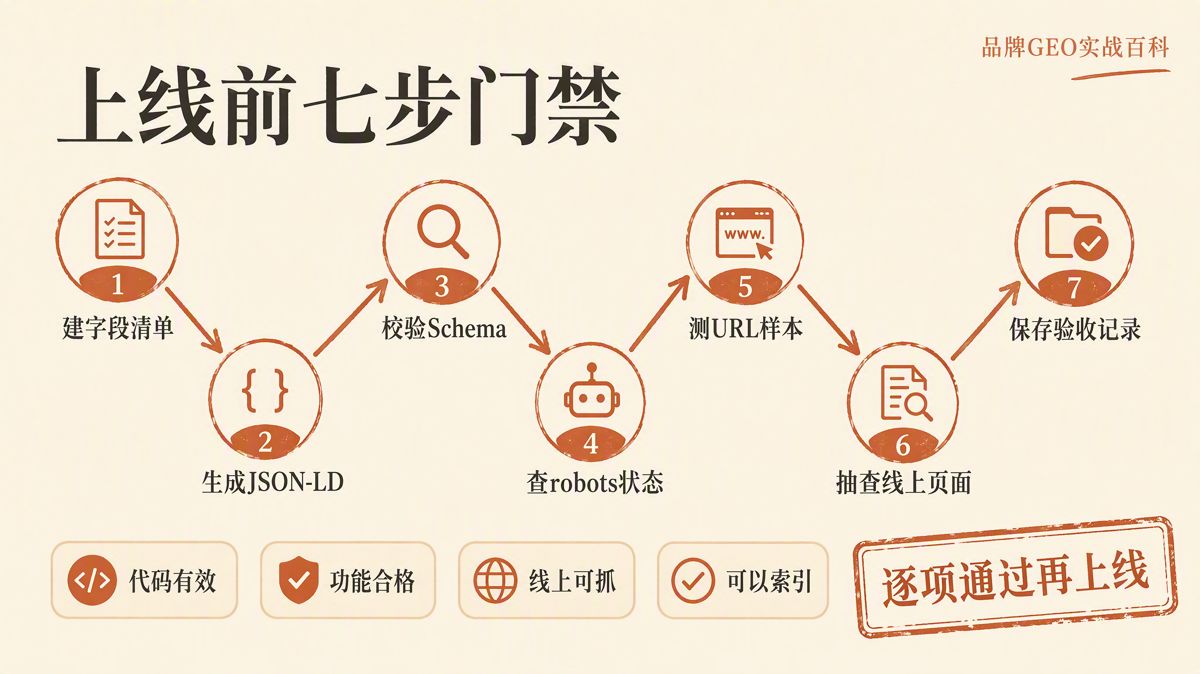
Before pushing code to production, complete this baseline workflow:
- Extract the visible data points from the target page template to establish the Schema entity types and relationships.
- Build the JSON-LD snippet and clear all syntax errors using the Schema.org Markup Validator.
- Run the code through feature-specific tools (such as Google's Rich Results Test) to verify required properties, then cross-check values against the visible page copy.
- Verify the HTTP response status, Content-Type, and headers for
/robots.txtacross every active protocol and subdomain. - Test a curated list of production URLs across major crawler tokens to verify that your
AllowandDisallowrules behave as designed. - Audit critical URLs to confirm that rendering assets are accessible, no accidental
noindextags are present, and canonical tags and sitemaps align. - Archive the final code, the robots.txt file, the test logs, the reviewer's name, and the deployment timestamp for future audits.
Log actual URLs and specific file versions in your audit records. Never mark a release as complete with vague statements like "Schema implemented" or "robots.txt updated." Whenever a template changes, directory structures shift, or CMS pipelines are modified, rerun the verification checklist.
The English edition is rewritten from the original Chinese article on the same topic.

Starbox AI is an AI marketing company based in Hangzhou, China. This article draws on Starbox project work. Please credit the source when quoting.
Related reading
 GEO Guide
Why AI Marketing Vendor Quotes Vary 10x: A 4-Step Vetting Checklist
Evaluate AI marketing proposals by delivery actions, not slide decks. Audit source infrastructure, fact cleaning, and clean-environment testing.
Oct 22, 2026 · 6 min read
GEO Guide
Why AI Marketing Vendor Quotes Vary 10x: A 4-Step Vetting Checklist
Evaluate AI marketing proposals by delivery actions, not slide decks. Audit source infrastructure, fact cleaning, and clean-environment testing.
Oct 22, 2026 · 6 min read
 GEO Guide
Spotting GEO Scams: What Actually Drives AI Recommendations?
Automated AI ranking promises violate how LLMs work. Real AI recommendations rely on authoritative, structured facts across trusted public sources.
Oct 22, 2026 · 4 min read
GEO Guide
Spotting GEO Scams: What Actually Drives AI Recommendations?
Automated AI ranking promises violate how LLMs work. Real AI recommendations rely on authoritative, structured facts across trusted public sources.
Oct 22, 2026 · 4 min read
 GEO Guide
How to Measure Your Brand's AI Visibility with a Spreadsheet
You do not need expensive software to track AI recommendations. A three-tier prompt framework and a simple spreadsheet can score your brand visibility in half a day.
Oct 21, 2026 · 6 min read
GEO Guide
How to Measure Your Brand's AI Visibility with a Spreadsheet
You do not need expensive software to track AI recommendations. A three-tier prompt framework and a simple spreadsheet can score your brand visibility in half a day.
Oct 21, 2026 · 6 min read