
Building Department-Level AI Capacity: What Tools Do You Need?

The short answer
Handing out AI accounts helps individuals finish tasks faster, but true departmental capacity requires workflows that maintain output without adding headcount.
Handing out a few AI accounts can help individual team members finish one-off tasks faster. It does not mean your department has built true AI capacity.
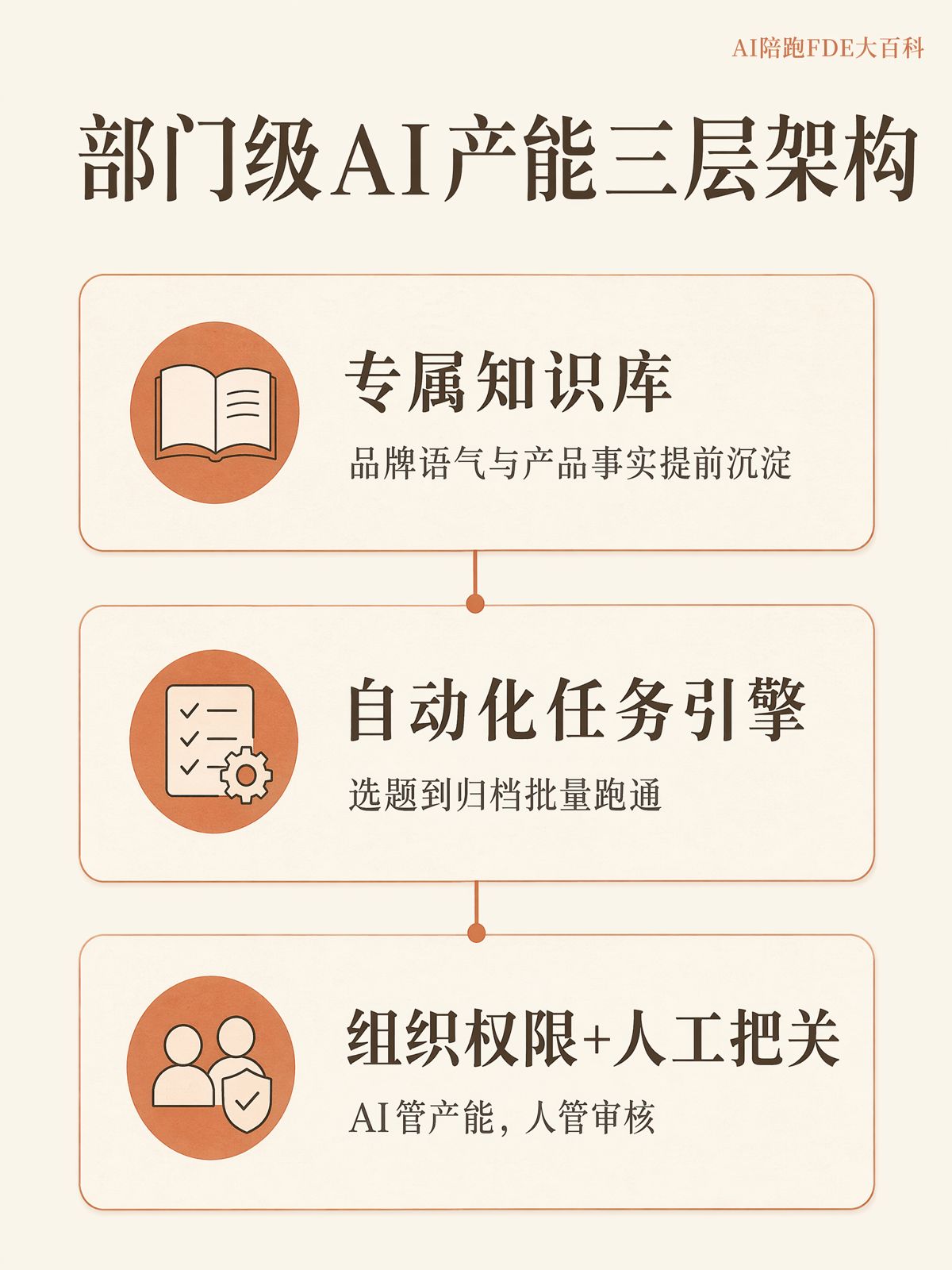
Department-level AI capacity means teams like marketing or customer service integrate AI directly into their daily workflows, maintaining consistent production volume without increasing headcount. That capacity relies on structured internal knowledge, standardized workflows, clear access controls, and ongoing operational maintenance—not on the improvised prompts of individual employees.
There is a simple litmus test for whether a department has developed this capability: if core personnel step away for a week, does baseline daily output hold steady?
If it does, your topic selection, drafting, quality assurance, and distribution are supported by established systems and processes. If output collapses, AI is still just an ad-hoc personal assistant used by a few individuals.
Companies Use AI, but Few Achieve Consistent Production
The 2025 China Entrepreneur Artificial Intelligence Application Survey Report found that 89.84% of Chinese enterprises already use AI tools, but only 16.41% have set up dedicated AI teams.
McKinsey's 2025 survey on AI adoption across Chinese enterprises revealed that only 6% qualify as "high-performance winners"—companies seeing substantial, measurable output from their AI initiatives.
Similarly, the 2025 The GenAI Divide report by MIT Project NANDA showed that among enterprise AI pilots, only 5% successfully transition into actual production environments with sustained business output. The remaining 95% fail to deliver measurable returns. The report also noted that partnering with specialized implementation providers yielded a success rate of roughly 67%, compared to roughly one-third of that for internal, DIY deployments.
These figures point to a consistent reality: while many organizations adopt AI tools, very few embed them into reliable daily production. Companies rarely suffer from a lack of AI accounts; they suffer from the lack of an operational support system.
Why General AI Chatbots Cannot Sustain Departmental Capacity
General-purpose large language models (LLMs) power standard AI chat interfaces. They can write, analyze, or answer questions based on an active conversation, but they do not inherently understand your proprietary product documentation, customer profiles, historical case studies, or internal operating standards.
A departmental AI platform is not built to solve a single generation task. It is built to execute an entire category of work repeatedly against standardized criteria.
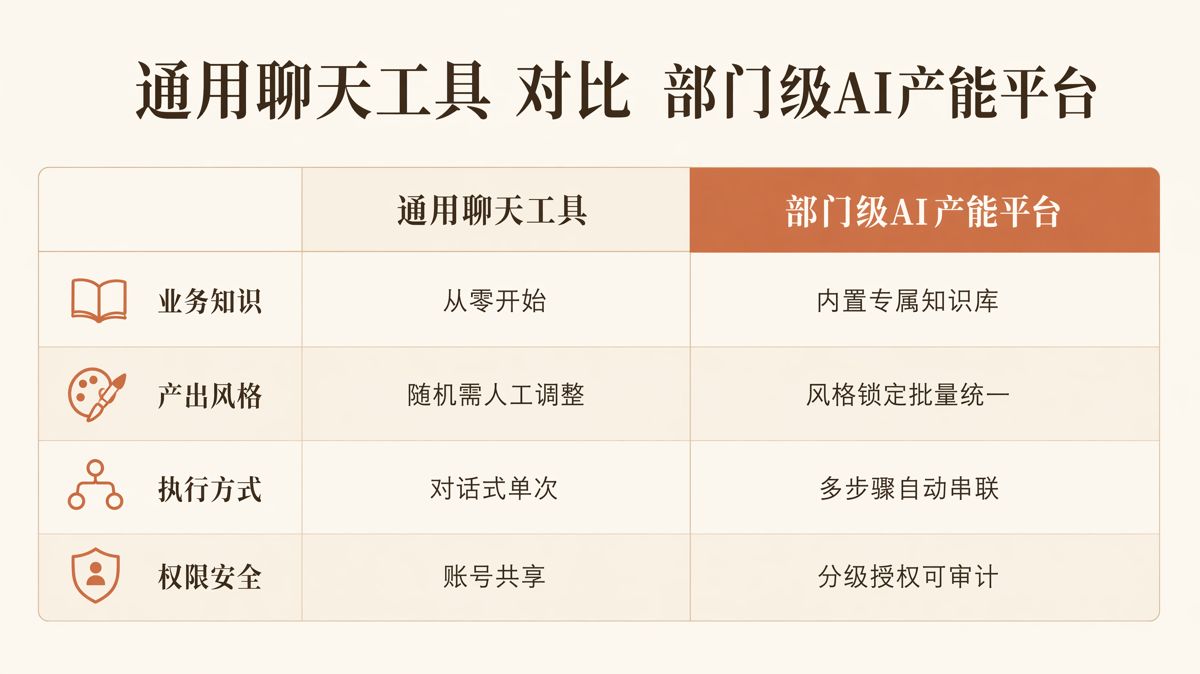
| Dimension | General AI Chatbots | Departmental AI Platforms |
|---|---|---|
| Business Knowledge | Relies on prompts and manual context pasted by users | Connects to dedicated knowledge bases to pull proprietary data |
| Output Consistency | Fluctuates with each prompt; requires constant manual editing | Standardizes brand voice, structure, and QA rules for batch consistency |
| Execution Method | Single-turn conversations requiring step-by-step human input | Automates topic selection, drafting, QA, and distribution into a continuous pipeline |
| Security & Permissions | Shared logins or loose controls risk cross-contamination of data | Uses role-based permissions with complete audit trails |
When two departments "use AI," one might only eliminate minor repetitive tasks, while the other dramatically scales its ongoing output. The differentiator is rarely the underlying model—it is whether knowledge bases, workflows, permissions, and operational ownership are in place.
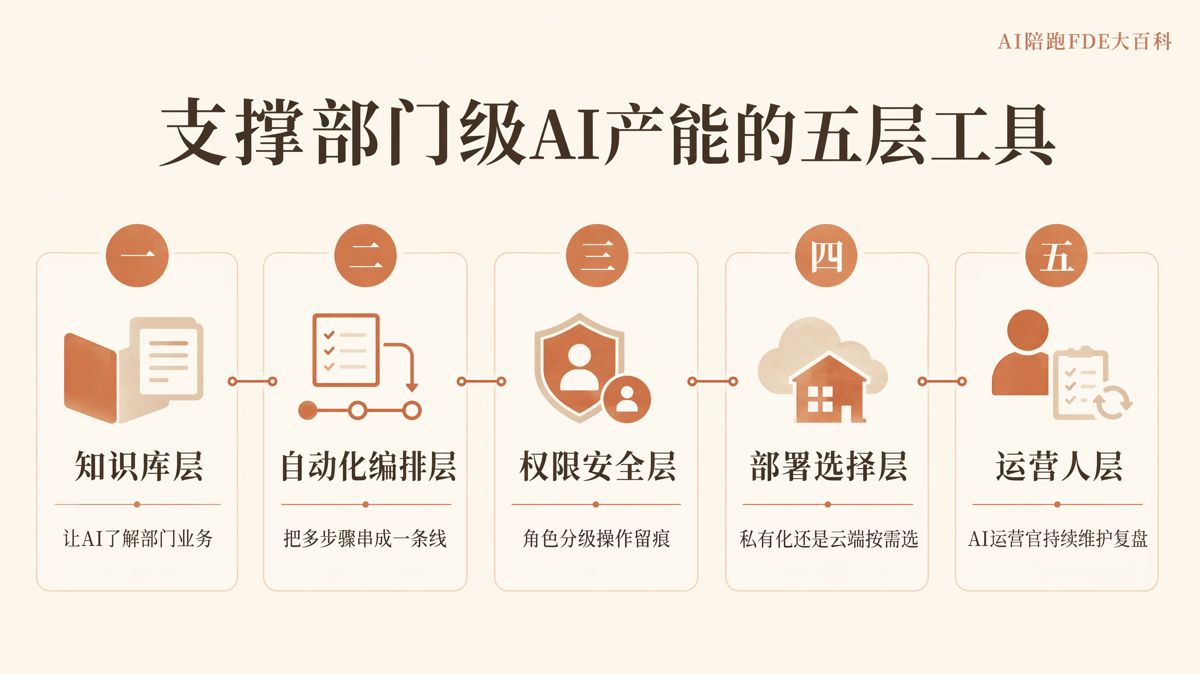
Four Core Problems Your Operating Foundation Must Solve
1. Can the AI Access Your Proprietary Data?
A proprietary knowledge base enables AI to retrieve and apply company-specific information during generation, rather than relying exclusively on public training data or prompt-level user inputs.
This setup typically relies on Retrieval-Augmented Generation (RAG). The workflow is straightforward: before the AI writes or answers, it queries your internal documentation for relevant context, then bases its response on those verified sources.
Without a structured knowledge base, AI outputs generic industry commentary, struggling to accurately reference specific product specs, customer contexts, standard answers, or past case studies.
Building a knowledge base is not just uploading a batch of raw files. Teams must clean and structure high-performing historical content, standard FAQs, technical manuals, and customer profiles into indexed directories the system can navigate. In practice, cleaning and organizing internal data often takes far more time than connecting the AI itself.
2. Can Multi-Step Workflows Run End-to-End?
An AI Agent is a system that calls upon data, tools, and execution steps to complete complex, multi-stage tasks. An Agentic Workflow organizes these steps into a fixed sequence for automated execution.
In a marketing team, for instance, topic ideation, initial drafting, visual asset pairing, editorial review, and multi-channel publishing traditionally sit across disconnected tools and roles. Automated orchestration unifies these steps into an end-to-end pipeline, eliminating the need for staff to toggle between platforms and execute each task manually.
Industry data from 2025 indicates that the enterprise AI Agent market in China stood at approximately 23.2 billion RMB, with projections reaching 65.5 billion RMB by 2027. This growth underscores an accelerating shift toward automated multi-step execution.
Knowledge bases and automated workflows must operate together. A knowledge base without automation still forces employees to manually search and prompt. An automated workflow without a knowledge base moves quickly, but produces content disconnected from business realities.
3. Are Permissions Controlled and Fully Auditable?
When connecting internal assets to an AI platform, organizations inevitably face two governance questions: Will our data be used by the vendor to train external foundation models? Can unauthorized internal staff or third parties view sensitive information?
The standard solution is Role-Based Access Control (RBAC). RBAC assigns viewing and editing permissions based on job functions, while audit logs record who accessed specific data, when, and what content was generated.
According to a 2025 study on small and medium-sized enterprises by the China Academy of Information and Communications Technology (CAICT), 51.56% of SMEs cited data compliance as their primary concern when adopting AI. Data compliance means managing data collection, usage, and storage in alignment with regulatory standards and internal corporate governance.
Role-based permissions, activity logging, and explicit data governance policies cannot be added as an afterthought. When evaluating platforms, confirm early: Does the vendor use your data for model training? Who can view and query internal files? Can the vendor provide verifiable technical documentation to prove it?
4. Is Someone Accountable for Long-Term Maintenance?
Once tools, knowledge bases, and workflows are deployed, they require ongoing operational ownership.
This role is often designated as an AI Operator. Core responsibilities include updating knowledge bases, reviewing output quality, tracking performance data, and refining workflows based on business results.
The operator does not need to author every asset manually, but must remain accountable for three things: ensuring the system uses correct data, verifying workflows run as intended, and confirming deliverables meet quality standards.
Without dedicated ownership, knowledge bases decay, automated processes break down without intervention, and enterprise systems are abandoned as teams experience staff turnover.
On-Premise vs. Cloud: A Deployment Choice, Not an Automatic Security Verdict
Once core operational capabilities are mapped out, companies must determine where the system will run.
On-premise deployment installs software on internal enterprise servers, keeping all data inside corporate infrastructure. Cloud deployment runs the software within an environment hosted by the vendor or a public cloud provider, typically billed on usage. A public cloud refers to shared compute and storage infrastructure managed by third-party providers.
Choosing between them requires balancing four factors: data sensitivity, regulatory compliance requirements, available budget, and internal IT capacity to manage servers, updates, and daily operational troubleshooting.
On-premise deployment does not automatically guarantee superior security. It still demands strict access controls, rigorous logging, and consistent internal maintenance. For smaller teams handling non-sensitive workflows, cloud deployments often meet operational and security needs effectively.
Departments do not always need on-premise infrastructure, and higher-cost configurations do not inherently deliver greater safety. The right architecture is the one that aligns with your operational realities and maintenance capabilities.

Why Many AI Initiatives Stall at the Pilot Stage
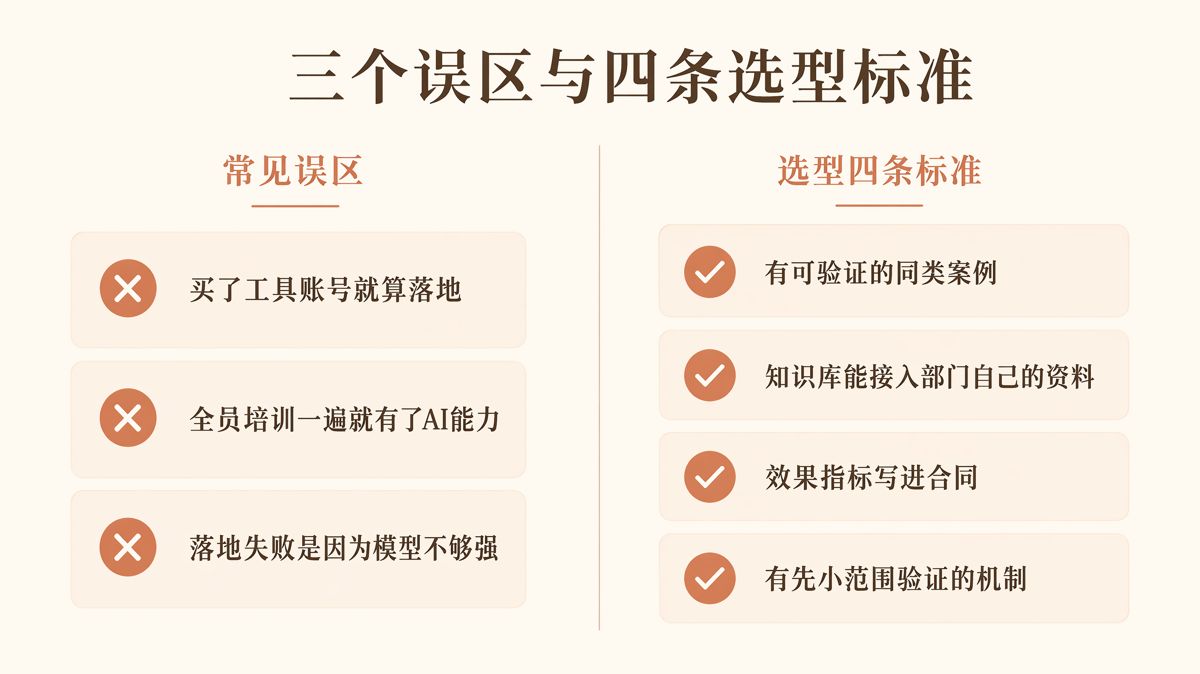
A common misstep is treating software procurement as successful adoption.
MIT Project NANDA's 2025 The GenAI Divide report revealed that while over 80% of enterprises have tested generative AI tools, only 5% of business-specific pilots ever reach production. Buying accounts proves access to software; it does not prove that tools have been integrated into daily business operations or that they generate sustained returns.
Another frequent failure mode is relying on one-time training. Training exposes employees to tool functionality, but it cannot substitute for structured knowledge bases, automated workflows, or operational oversight. When training ends without systemic operational support, teams usually revert to manual habits within a few months.
When pilots underperform, organizations often blame the underlying AI model. Yet findings from both MIT NANDA and McKinsey point to unstructured data, poorly designed workflows, and a lack of accountability as the real culprits. When results fall short, review your knowledge assets, workflows, and staffing before switching models.
How to Evaluate Platforms: Look Beyond the Feature List
A platform with an extensive feature list will not necessarily build departmental capacity. Evaluate vendors against four verifiable criteria:
Verifiable peer case studies. Look beyond vendor presentations. Confirm whether you can speak directly with referenceable clients of similar size and industry to verify actual operational performance.
True proprietary data ingestion. A functional knowledge base cannot be limited to generic prompt templates. Ensure the platform can ingest, index, and accurately retrieve your specific product manuals, customer records, standard operating procedures, and past case studies during production.
Contractually committed performance metrics. Verbal promises during sales demos differ fundamentally from agreed-upon metrics in a legal contract. Establishing clear success criteria in writing directly impacts project delivery and vendor accountability.
Controlled, small-scale pilot options. Testing a single, measurable business scenario with clear benchmarks before expanding department-wide is the most reliable way to manage investment risk.
What to Do When a Pilot Underperforms
Implementation providers often state that focusing on a tightly scoped, high-velocity business scenario can yield measurable output improvements within 3 to 6 months.
Treat this as an industry rule of thumb rather than a guaranteed outcome. The actual timeline depends on your pre-pilot baseline output, target metrics, knowledge base readiness, and dedicated operational support. Your pre-pilot baseline serves as the benchmark against which all progress is measured.
If your pilot fails to move the needle, do not immediately dismiss the technology or scale up spending. Check three variables first: Was the initial scope too broad? Is the internal knowledge base incomplete or unorganized? Is there a designated owner actively managing the workflows?
Address these questions before deciding whether to iterate or change platforms.
Department-level AI capacity comes down to four foundations: accessing proprietary data, orchestrating multi-step workflows, enforcing auditable access controls, and maintaining operational ownership. Deployment models—whether cloud or on-premise—should be chosen based on compliance mandates, budget, and internal maintenance bandwidth.
When these foundations are in place, AI stops being an isolated tool for individual employees and becomes an organizational engine that sustains departmental production over the long term.
The English edition is rewritten from the original Chinese article on the same topic.

Starbox AI is an AI marketing company based in Hangzhou, China. This article draws on Starbox project work. Please credit the source when quoting.
Related reading
 AI Adoption
Can One AI Operator Really Replace 10 People?
Claims of 10x headcount cuts count generation speed, not QA and rework. Real efficiency measures net pipeline hours saved.
Oct 22, 2026 · 6 min read
AI Adoption
Can One AI Operator Really Replace 10 People?
Claims of 10x headcount cuts count generation speed, not QA and rework. Real efficiency measures net pipeline hours saved.
Oct 22, 2026 · 6 min read
 AI Adoption
Bought Basic AI and Seeing Zero ROI? A 4-Step Activation Playbook
Activating entry-level AI is not about model parameters. Turn open chat boxes into defined operational stations with clear inputs, templates, and QA checklists.
Oct 22, 2026 · 6 min read
AI Adoption
Bought Basic AI and Seeing Zero ROI? A 4-Step Activation Playbook
Activating entry-level AI is not about model parameters. Turn open chat boxes into defined operational stations with clear inputs, templates, and QA checklists.
Oct 22, 2026 · 6 min read
 AI Adoption
Why One-Click AI Fails at Work: How to Pick Enterprise Agents
One-click AI tools seem easy, but their first-draft accuracy is terrible. Real business ROI requires multi-step workflows with your own knowledge base.
Oct 21, 2026 · 6 min read
AI Adoption
Why One-Click AI Fails at Work: How to Pick Enterprise Agents
One-click AI tools seem easy, but their first-draft accuracy is terrible. Real business ROI requires multi-step workflows with your own knowledge base.
Oct 21, 2026 · 6 min read