# 9 Pre-Launch Checks for SEO and AI Crawlers
> A page loading in your browser does not mean AI bots can read it. Run these 9 technical checks before launch to ensure your content is discoverable.
Source: https://www.starbox.work/en/insights/geo-guide/geo113/ (Starbox AI Insights, updated 2026-10-04)
A crawler (or bot) is an automated program that search engines and AI platforms use to discover web pages and parse their content.
Just because you finished writing the copy and the page opens cleanly in your browser does not mean crawlers can discover, access, and interpret it. Crawlers may fail to find the URL, get blocked at the network perimeter, or receive an empty page shell stripped of core copy.
To run an effective technical audit, distinguish between these four stages:
- **Discovery:** The platform discovers that the URL exists.
- **Crawling:** The crawler requests the page and downloads its raw content.
- **Indexing:** The platform parses and stores the page data in a searchable index.
- **Citation:** An AI platform retrieves and references the page content when generating answers.
These stages do not trigger automatically in sequence. Discovering a URL does not guarantee crawling, and a successful crawl does not guarantee indexing or AI citation.
Similarly, an HTTP 200 OK status code only means the server handled the request without error. It does not prove that the initial HTML payload delivered to the bot contains readable body text.
Before taking a site or major update live, answer these four questions:
1. Can the page be discovered?
2. Can the page be accessed normally?
3. Can the core content be parsed from the raw response?
4. Do server logs verify successful visits from targeted crawlers?
Server logs record actual traffic handled by your origin server or content distribution network (CDN). They show precisely who requested which URL, when the request occurred, and what response code the server returned.
Avoid four common misconceptions before auditing:
- Adding an `Allow` directive in `robots.txt` does not guarantee the page will be crawled.
- An HTTP 200 status code does not guarantee that page text is readable.
- Allowing search crawlers does not mean AI training crawlers or user-triggered browse agents follow the same access rules.
- A request with a recognized User-Agent header does not prove the request originated from an official platform bot.
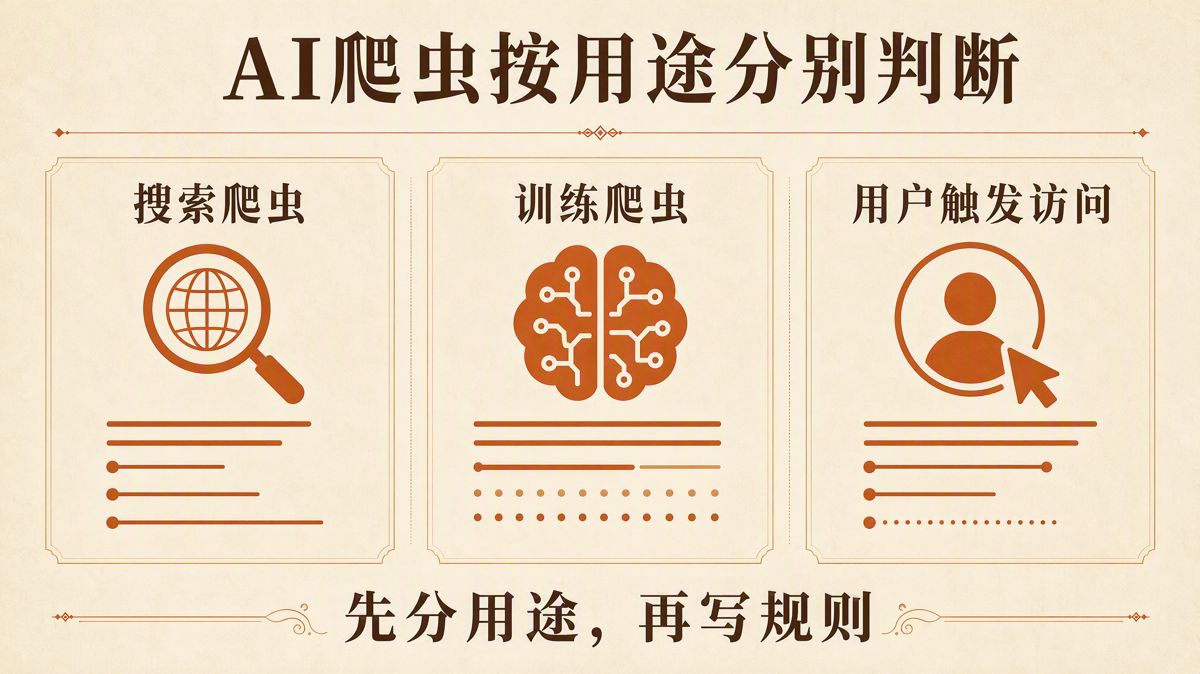
Leading AI platforms configure separate User-Agent strings for web search, model training, and user-triggered retrieval. Sites need granular policies based on business goals rather than a single catch-all rule.
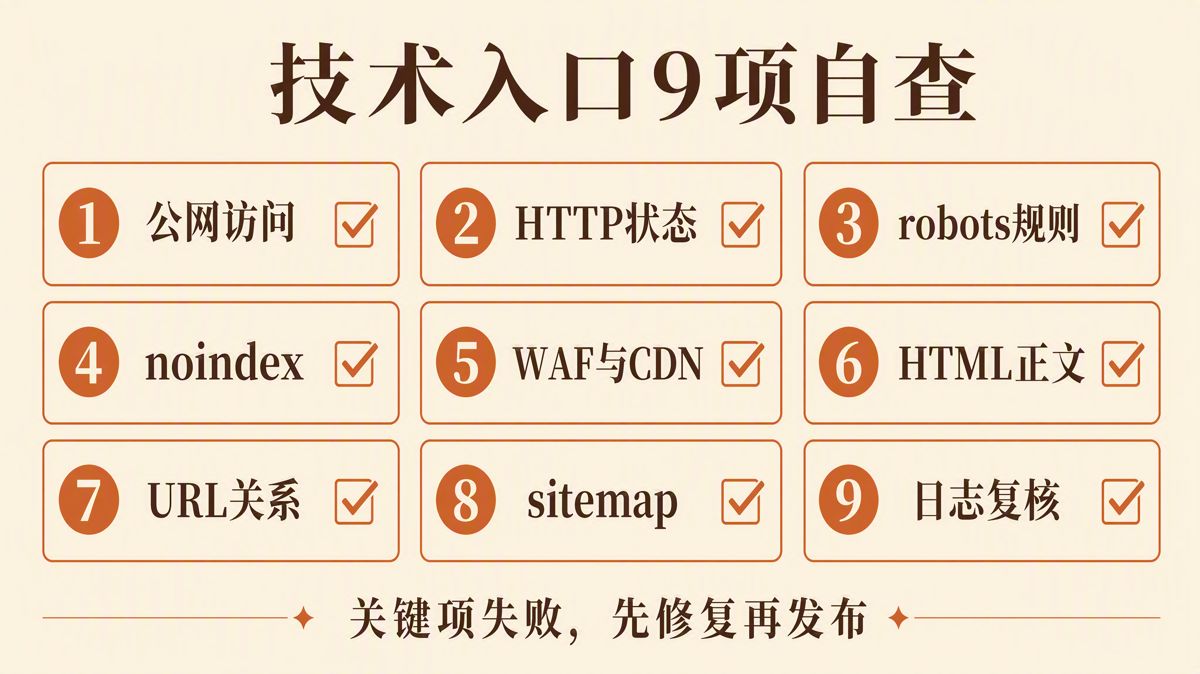
Audit the following 9 items from server response down to raw server logs. If any critical item fails, resolve it before launch.
| Checklist Item | Passing Criteria | Common Issues |
|---|---|---|
| 1. Public accessibility | URL loads without login; domain and HTTPS certificates are valid | Login walls, SSL errors, regional geo-blocking |
| 2. HTTP status code | Target URL directly or cleanly resolves to HTTP 200 | 4xx errors, 5xx errors, soft 404s, redirect chains |
| 3. `robots.txt` | Clear allow/disallow directives configured per User-Agent role | Broad wildcard rules unintentionally blocking the entire site |
| 4. `noindex` directives | Indexable pages contain no "do not index" commands | Forgotten staging tags in page templates or HTTP response headers |
| 5. WAF and CDN rules | Official platform crawlers are not blocked by security challenges | Relying solely on `robots.txt` while WAFs silently drop bot traffic |
| 6. HTML body copy | Raw initial HTML contains core facts, copy, and structural data | Empty container shells where copy requires client-side JavaScript |
| 7. URL consistency | Canonical tags, redirects, and internal links point to the same URL | Conflicting canonicals or alternating desktop/mobile variants |
| 8. Sitemap accuracy | Sitemaps contain only clean, 200-status URLs with accurate dates | Sitemaps populated with 404s, redirects, staging URLs, or fake `lastmod` timestamps |
| 9. Server log verification | Server logs record real bot hits with matching HTTP 200 statuses | Relying exclusively on web testing tools without verifying server-side access logs |
## 1. Is the Production Page Truly Open to the Public Web?
Do not test site readiness by checking CMS preview screens. Audit the final production URL in an incognito browser session without active logins or cached assets.
Verify the following:
- DNS records point directly to the live production server.
- The HTTPS certificate is valid and without browser warnings.
- The page does not require user authentication or account logins.
- The page does not serve an interactive CAPTCHA on initial load.
- The server does not block traffic based on geographic IP location.
- Access is not restricted to internal or whitelisted corporate IP addresses.
Loading a staging or development environment proves only that staging works. Preview URLs and internal staging links cannot serve as proxies for live production crawler access.
## 2. Does the HTTP Status Code Reflect the True Outcome?
HTTP status codes represent the server's formal response to a client request:
- **200:** The request succeeded.
- **3xx:** The resource has moved and requires a redirect.
- **4xx:** The request contains an error, the resource is missing, or access is unauthorized.
- **5xx:** The server encountered an error processing the request.
Google's baseline technical requirements specify that Googlebot must not be blocked, the URL must return HTTP 200, and the response must contain indexable content.
Meeting these minimum requirements grants eligibility for indexing, but does not guarantee it. Review the complete requirements in the [Google Search Technical Essentials](https://developers.google.com/search/docs/essentials/technical).
When reviewing status codes, do not rely solely on how a page renders in a browser. A "soft 404" happens when a server delivers an error message (such as "Page Not Found") within a regular template while returning an HTTP 200 OK header. Search engines may treat these as broken pages.
Inspect the complete redirect path. Some pages bounce through multiple intermediary URLs, or trigger redirect loops on mobile user agents. Looking only at the final destination URL masks technical debt along the path.
Record the following fields during your audit:
| Field | Verification Requirement |
|---|---|
| Original URL | Must match the planned, permanent production URL |
| Initial Status | Check whether the initial response returns 200, 3xx, 4xx, or 5xx |
| Redirect Chain | Confirm redirects are direct (single-hop) and terminate at the official URL |
| Final Status | Must consistently return HTTP 200 |
| Content-Type | Verify MIME types (e.g., text/html, application/pdf, image/webp) match asset formats |
| Response Time | Check for network latency, timeouts, or intermittent packet drops |
## 3. Is `robots.txt` Configured by Crawler Role?
A `robots.txt` file instructs web crawlers which paths they can or cannot request. It manages crawling volume; it is not a tool for keeping sensitive pages out of an index.
Google explains that `robots.txt` is primarily designed to manage crawl traffic. If you need to keep a page out of Google Search results, allow crawlers to access the page and apply a `noindex` directive, or require user authentication. See the [Google robots.txt guide](https://developers.google.com/search/docs/crawling-indexing/robots/intro).
AI platforms use distinct User-Agent strings depending on the purpose of the visit. Avoid uploading a generic template that allows or blocks all bots indiscriminately. Define specific business policies first:
- Do you want your pages to appear in real-time AI search results?
- Do you allow platforms to crawl content to train foundation models?
- Do you want AI models to browse and retrieve your pages when prompted by active users?
Once defined, configure rules according to each platform's documentation:
| Platform | User-Agent | Documented Purpose |
|---|---|---|
| OpenAI | `OAI-SearchBot` | Retrieves web pages for ChatGPT search results |
| OpenAI | `GPTBot` | Crawls web data for foundation AI model training |
| OpenAI | `ChatGPT-User` | User-initiated browsing actions triggered within ChatGPT |
| Anthropic | `Claude-SearchBot` | Crawls web data to improve search citations |
| Anthropic | `ClaudeBot` | Crawls web data for AI model training datasets |
| Anthropic | `Claude-User` | Fetches web pages triggered by direct user queries |
| Perplexity | `PerplexityBot` | Indexes web pages to source and cite links in Perplexity search |
| Perplexity | `Perplexity-User` | User-initiated page fetches for real-time query resolution |
OpenAI lets site owners manage `OAI-SearchBot` independently from `GPTBot`. Anthropic separates `Claude-SearchBot`, `ClaudeBot`, and `Claude-User`. Perplexity differentiates automated indexing via `PerplexityBot` from user browsing via `Perplexity-User`.
For details, review the [OpenAI crawler documentation](https://developers.openai.com/api/docs/bots), the [Anthropic crawler guide](https://support.claude.com/en/articles/8896518-does-anthropic-crawl-data-from-the-web-and-how-can-site-owners-block-the-crawler), and the [Perplexity crawler documentation](https://docs.perplexity.ai/docs/resources/perplexity-crawlers).
## 4. Are `noindex` and `X-Robots-Tag` Accidentally Blocking Live Pages?
A `noindex` rule tells search engines not to display a page in search results. For pages intended for public discovery, inspect three areas:
- HTML `` tags in the page head.
- `X-Robots-Tag: noindex` HTTP response headers returned by the web server.
- CMS visibility settings (e.g., WordPress "Discourage search engines" toggles).
When migrating staging sites to production, teams frequently carry over global `noindex` directives. Checking only page copy while missing server headers or global theme templates leads to accidental de-indexing.
Never block a page in `robots.txt` if you need search engines to read a `noindex` directive. If `robots.txt` blocks access, crawlers will never fetch the page to discover the `noindex` instruction, and the URL may still appear in search results based on external anchor text.
To restrict access completely, use HTTP authentication or password protection. For public assets you wish to exclude from specific AI indexes, configure directives according to platform specifications.
## 5. Are WAF, CDN, or Anti-Bot Rules Silently Intercepting Crawlers?
A Web Application Firewall (WAF) identifies and mitigates malicious traffic, while a Content Delivery Network (CDN) caches and delivers content across edge nodes. Both operate independently of `robots.txt` rules.
Allowing a crawler in `robots.txt` only means your crawling policy permits access. It does not prevent your WAF, CDN edge rules, or security plugins from dropping crawler requests.
Common blocking triggers include:
- Treating cloud data center IP addresses as automated scraping attacks.
- Serving CAPTCHA challenges to non-browser User-Agent headers.
- Setting rate-limiting thresholds too aggressively for high-volume crawlers.
- Enforcing regional geo-blocking rules that exclude global crawler servers.
Do not rely solely on User-Agent strings when setting WAF whitelists; User-Agent headers can be spoofed. Validate legitimate bot visits by checking incoming requests against official IP address ranges or reverse DNS lookups.
Perplexity advises website administrators to verify both User-Agent strings and official IP address pools in their WAF configurations, updating IP lists regularly. OpenAI similarly publishes official IP ranges for its bots.
After modifying firewall policies, check your origin server and CDN edge logs to verify that crawler requests return HTTP 200, rather than trusting a "rule enabled" toggle in a management console.
## 6. Does the Initial Server HTML Contain Core Copy?
Web browsers download initial HTML, parse scripts, and execute JavaScript to render dynamic copy, tables, and interface components.
Do not assume automated crawlers execute JavaScript the same way browsers do. While Googlebot renders JavaScript, its execution pipeline operates asynchronously. Many AI crawlers, retrieval engines, and user-directed browse agents do not execute complex client-side scripts at all.
Inspect the raw HTML returned on the initial server response. Verify that the raw payload includes:
- Page title (`` and `<h1>`).
- Primary claims and introductory conclusions.
- Data tables and quantitative comparisons.
- Structured FAQs.
- Author and publisher metadata.
- Core contextual internal links.
If the initial HTML response delivers only an empty `<div>` container that requires client-side JavaScript execution to fetch text, assume AI crawlers will miss the content.
Evaluate rendering by comparing three views:
1. View raw page source (`Ctrl+U` or `curl`).
2. Disable JavaScript in developer tools and reload the page.
3. Fetch the page using specific target User-Agent strings.
If the core content disappears when JavaScript is disabled, consider shifting your delivery architecture:
- **Server-Side Rendering (SSR):** The server generates the full HTML payload for each request before transmission.
- **Static Site Generation (SSG):** HTML pages are pre-built at compile time and served as static files.
- **Dynamic Pre-rendering:** The server returns pre-rendered static HTML specifically to search and AI crawlers.
Browsers rendering a page does not mean crawlers parsed it. Validate content delivery based on the raw payload the crawler receives.
## 7. Do Canonicals, Redirects, and Internal Links Align?
A single page can often be accessed through multiple URL variations:
- URLs with tracking parameters vs. clean URLs.
- Mixed uppercase and lowercase letters.
- URLs with trailing slashes vs. without trailing slashes.
- HTTP vs. HTTPS protocols.
- `www` vs. non-`www` domains.
The canonical tag (`<link rel="canonical" href="...">`) declares which URL variation is the authoritative, primary version.
Before launch, establish a single canonical URL structure for every page. Ensure canonical tags, 301 permanent redirects, XML sitemaps, navigation menus, and in-body internal links point to that exact destination.
Eliminate three common routing conflicts:
1. Canonical loops (Page A points to Page B, while Page B lists Page A as canonical).
2. Device-level redirects where desktop and mobile URLs bounce back and forth.
3. Sitemaps submitting legacy URL paths while internal navigation uses new URLs.
When technical signals conflict, search engines choose the canonical version themselves. Their choice may not match your intended URL structure.
## 8. Are Sitemaps and Internal Discovery Paths Clean and Accurate?
An XML sitemap gives search engines an index of pages available for crawling. It must contain only primary, crawlable, 200-status URLs you intend to index.
Remove the following from XML sitemaps:
- 404 broken pages.
- URLs that redirect (301 or 302).
- URLs containing `noindex` directives.
- Development, staging, or preview environments.
- Parameter-heavy duplicate URLs.
Use the `<lastmod>` tag accurately. It should reflect the timestamp of substantive content modifications. Do not configure automated scripts to update `<lastmod>` to the current date every day without real page updates.
Verify that your sitemap matches your site's internal architecture. Main navigation bars, breadcrumbs, internal links, and sitemaps should all point to the exact same canonical URL versions.
## 9. Have You Verified Visits Through Logs and Platform Tools?
Pre-launch validation should not end with local browser inspections or third-party audit crawlers. Review your live server or CDN logs to confirm real-world crawler activity.
Server logs must confirm three details:
1. Did the target User-Agent attempt to access the site?
2. Which specific URL did the bot request?
3. What final HTTP status code did the server return?
Ensure your log aggregation records these fields:
- User-Agent header
- Timestamp
- Requesting IP address
- Request path and URI parameters
- HTTP response status code
- Total response time (latency)
Reviewing these fields lets you separate three root causes:
- The crawler has not visited the page yet.
- The crawler attempted a visit but was blocked by a firewall or returned an error.
- The crawler accessed the page, but received empty or unexpected payload content.
For Google, verify behavior using Google Search Console's URL Inspection tool, Indexing reports, and Crawl Stats. For OpenAI, Anthropic, and Perplexity, cross-reference their published crawler documentation and IP lists with your edge server logs.
Allow time for propagation after updating access policies. Both OpenAI and Perplexity note that updates to `robots.txt` and crawler access rules can take up to 24 hours to reflect across their systems.
## Pre-Launch Go/No-Go Decision Matrix
| Audit Outcome | Launch Status | Action Required |
|---|---|---|
| Red Light | **Halt Launch** | Production URLs return non-200 statuses; target crawlers are blocked; indexable pages contain `noindex`; or initial HTML contains no core copy. |
| Yellow Light | **Pause and Retest** | Redirect chains exist; canonical tags conflict; sitemaps contain outdated paths; or WAF rules have not been verified in access logs. |
| Green Light | **Approved for Launch** | URLs are publicly accessible; status codes return 200; crawler policies match business goals; content renders in initial HTML; and logs confirm clean access. |
Passing these 9 checks ensures your site has resolved its internal technical barriers. It confirms your pages are technically discoverable, accessible, and readable. It does not, however, guarantee immediate indexing, ranking, or AI citations.
Whether an engine visits, when it updates its index, and how it surfaces answers remain governed by external algorithms. The goal of a pre-launch technical audit is to eliminate every point of failure within your own control.
## Frequently Asked Questions (FAQ)
### 1. Does an "Allow" rule in robots.txt guarantee an AI bot will crawl the page?
No. An `Allow` rule simply means `robots.txt` does not prohibit access. Firewalls, CDNs, network performance, status codes, content quality, and platform crawling schedules all determine whether a bot actually fetches a URL. Verify actual visits using server logs.
### 2. Does blocking GPTBot also opt your site out of ChatGPT Search?
No. According to OpenAI's documentation, `GPTBot` and `OAI-SearchBot` serve different functions. `GPTBot` crawls content to train foundation AI models, while `OAI-SearchBot` retrieves live web pages for ChatGPT search citations. You can manage them separately in `robots.txt`.
### 3. Can robots.txt completely prevent a page from appearing in Google?
No. A `robots.txt` file is designed to control crawl traffic, not indexation. If a page is blocked in `robots.txt` but linked from other public sites, Google can still index the URL without fetching its content. To prevent indexing, allow crawling and use a `noindex` tag, or protect the page behind login authentication.
### 4. Why might a crawler fail to read a page that displays fine in a browser?
The page may rely on client-side JavaScript execution, cookie sessions, user logins, regional IP restrictions, or CAPTCHA challenges. Review the raw initial HTML payload returned by the server with JavaScript disabled to confirm what a crawler receives.
### 5. Does a matching User-Agent string confirm a legitimate crawler?
No. User-Agent strings can be spoofed by any HTTP client. Validate crawler authenticity by matching incoming requests against the platform's published IP ranges or running reverse DNS lookups.
### 6. How quickly will search engines or AI platforms index or cite a site after passing these checks?
There is no fixed timeframe. Passing technical checks confirms that crawlers can physically access and read your pages. How quickly and frequently platforms crawl, index, or cite your content depends on their internal crawling schedules and content evaluation systems.